Can You 3D Print an AI-Generated Model? What We Found Inside 16 of Them
Published 2026-10-20

Image-to-3D services call their output printable. We took four objects, ran each through four generators, and put all 16 models through a slicer and a repair tool to see what that word holds up to.
What we fed them
Three of the inputs are phone photos taken for this test: a mug, a phone charger and a small 3D printed jack-o’-lantern. The fourth is the keychain figurine from our scale test. That image is itself AI generated, which makes it a cleaner input than any photo, and we kept it so the two datasets share a model.
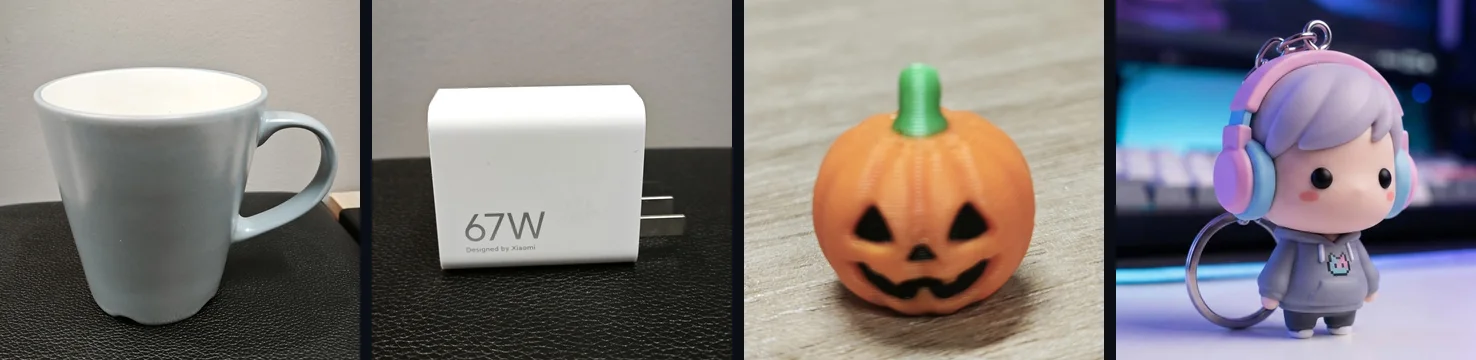
Each object was chosen for a different way to fail. The mug is an open vessel with a handle. The charger is a box with two thin pins. The pumpkin’s face could be shape or only colour. The figurine has small parts and a base it should stand on.
The generators were TRELLIS.2, Hunyuan3D-2.1 and Stable Fast 3D through their official Hugging Face Spaces at default settings, and Neural4D in its web app. Hunyuan3D-2.1 was run shape only, without texture, because its textured mode asks for 270 seconds of free GPU time per run, more than the free quota could cover for every object. Each object got one run per generator.
The author of this site works for the company that makes Neural4D. It was run in its web app with default settings and downloaded as an untextured model, the download a free account gets; every setting used is available on a free account. A free account’s 50 weekly credits cover about one generation, so these runs used more credits than that. Its files went through the same script as everyone else’s, and this piece ranks nothing. Its models are in the tables but not in the pictures.
TripoSG’s official Space failed on every attempt. Meshy, Tripo and Rodin put the GLB and STL download behind a paid plan, so there was nothing to measure without paying.
The check everyone runs passed 11 of 16
First, size. All 16 came out about 1 or 2 units across, whether the object was a mug or a charger, exactly as in our scale test: none of them has a real size until you give it one. So every model was scaled so its longest side is 80 mm and checked the usual way: are there holes, are there non-manifold edges, is it one piece.
| Generator | Watertight as downloaded | Separate shells (mug, charger, pumpkin, figurine) |
|---|---|---|
| Stable Fast 3D | 4 of 4 | 1, 1, 1, 1 |
| TRELLIS.2 | 0 of 4 | 6, 8, 6, 68 |
| Hunyuan3D-2.1 | 4 of 4 | 1, 1, 1, 1 |
| Neural4D | 3 of 4 | 1, 1, 1, 2 |
By that check, TRELLIS.2 looks like the problem and everything else looks fine. The TRELLIS.2 files did have defects: up to 401 open edges and 266 non-manifold edges, and the figurine came in 68 pieces. Neural4D’s figurine had 8 open edges and a second shell. But holes and loose pieces are what a one-click repair is for, and the repair section below shows it closed every one of these files. The defects that matter most are not in this table at all.
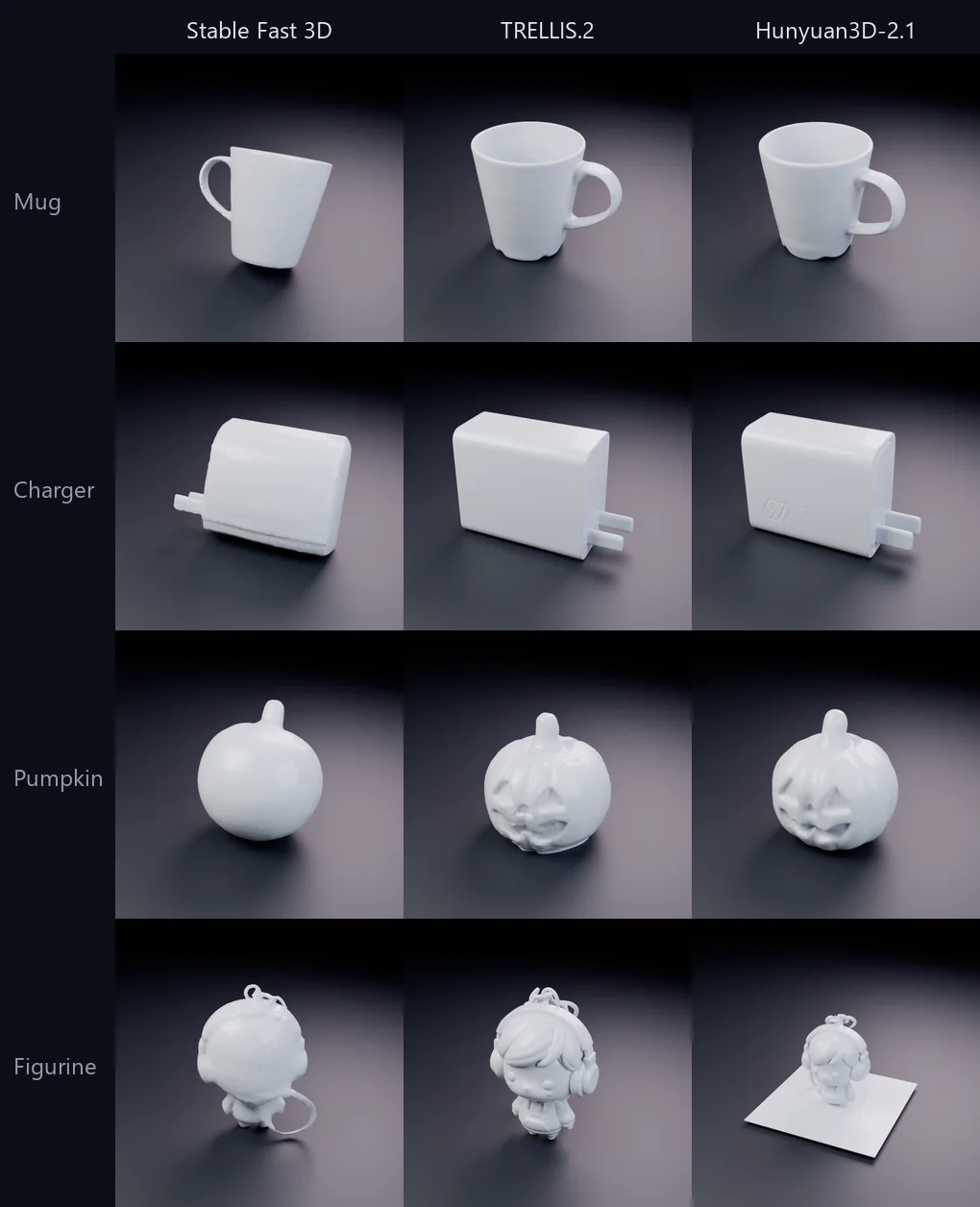
Here are 12 of the models in plain grey plastic, without their textures, which is closer to what a single-colour printer will make of them:
A skin, not a solid
All four TRELLIS.2 models are hollow. Every surface is a pair of surfaces about 0.16 mm apart, with nothing between them and nothing inside. At 80 mm that is thinner than one line from a 0.4 mm nozzle. Because the gap is a fixed fraction of the model’s size, about 1/500, printing larger only thickens it to 0.4 mm at 200 mm.
You cannot see this from outside. The render looks like a mug. Cut it at half its height and fill the cut the way a slicer does, and the difference is plain:
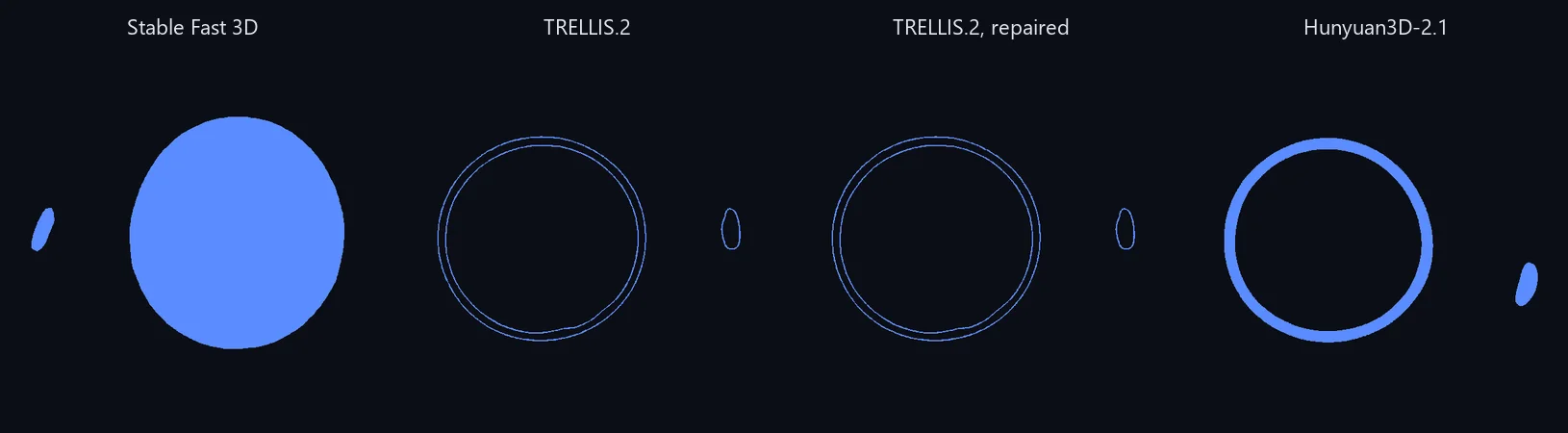
The TRELLIS.2 mug’s wall is two outlines with empty space between them where the ceramic should be. Measured as volume against the model’s convex hull, the four TRELLIS.2 models are 1.1 to 3.6% full. A real mug with a cavity is about 20%, and the solid models here ranged from 64 to 96%.
The slicer did not refuse them. It printed what was there:
| Filament used (m) | Stable Fast 3D | TRELLIS.2 | Hunyuan3D-2.1 | Neural4D |
|---|---|---|---|---|
| Mug | 16.44 | 0.49 | 11.26 | 11.11 |
| Charger | 11.26 | 0.50 | 13.69 | 12.11 |
| Pumpkin | 23.28 | 1.32 | 23.53 | 22.42 |
| Figurine | 8.58 | 0.78 | 5.70 | 8.66 |
Estimated print times say the same thing: 17 to 43 minutes for the TRELLIS.2 models, over an hour for every other model, and up to three hours for the pumpkins. If a slicer quotes a suspiciously short time for a generated model, this is the first thing to check.
Solid where it should be hollow
Stable Fast 3D’s mug has the opposite problem. It is watertight and one piece, and its opening is sealed. The cut at mid-height is a filled disc. By volume it is 85.2% of its hull, against 20.8% for Hunyuan3D-2.1’s mug and 19.2% for Neural4D’s. Those two have real walls, 2.5 and 2.6 mm thick. As a print it would be a solid plug the shape of a mug, using 16.44 m of filament where the hollow versions take about 11.
The pumpkin shows a related limit. The jack-o’-lantern in the photo has its face in a second colour of filament. Stable Fast 3D put the face only in the texture, so its geometry is a smooth ball. TRELLIS.2 and Hunyuan3D-2.1 cut the face into the shape. Which is right depends on the object, but only one of them survives a single-colour print.
How it lands on the bed
No slicer rotates a model on import. It takes Z as up and puts the lowest point on the bed.
Stable Fast 3D’s models came out tilted. The mug’s base sits 24.5 degrees off the floor, the charger’s 18.6 and the pumpkin’s 21.6. The files contain no rotation to undo it, so the tilt is in the geometry itself. As the files land, the mug touches the bed with 1.2 square millimetres of its first layer and the charger with 1.1: a point, not a base. Neural4D’s mug, standing upright, touches with 47.4.
Hunyuan3D-2.1’s STLs land on their side. Its STL export keeps the Y-up axes of the GLB, so in a slicer every model lies on its back, as we first saw in the scale test. For the charger that happens to be a good way to print it, flat on its largest face. For the mug it means 7.8 square millimetres on the bed.
Both are a minute’s fix: lay the model flat on its base before slicing. Bambu Studio and PrusaSlicer both have a tool for it. They are easy to miss because the slicer does not warn about either.
Extra pieces and stray sheets
Two models carried geometry that is not part of the object:
- Hunyuan3D-2.1’s figurine stands on a thin square sheet, 0.47 mm thick and wider than the figurine, fused into the same shell. We reported it in the scale test, where it made the file’s longest side the width of the sheet. It appeared on the figurine only, not on the mug, charger or pumpkin.
- TRELLIS.2’s figurine is 68 separate shells. Repair merged them into 2.
A sheet like that will print as part of the model. The STL viewer shows it on sight and reports the shell count.
What repair fixed, and what it did not
Every model went through the Windows 3D printing repair service, the same service PrusaSlicer calls when you choose “Fix through the Netfabb”. It took between half a second and 84 seconds per model.
It did its job. All 16 came out watertight, TRELLIS.2’s charger went from 8 shells to 1, and its figurine from 68 to 2. Then we measured again:
| TRELLIS.2 | Watertight | Shells | Volume, % of hull | Thinnest wall | Filament |
|---|---|---|---|---|---|
| Mug, before | no | 6 | 2.4 | 0.16 mm | 0.49 m |
| Mug, after | yes | 1 | 2.4 | 0.16 mm | 0.49 m |
| Pumpkin, before | no | 6 | 1.1 | 0.16 mm | 1.32 m |
| Pumpkin, after | yes | 1 | 1.1 | 0.16 mm | 1.31 m |
The volume barely moved: the most any TRELLIS.2 model gained was 0.2 percentage points, on the charger. A repair tool closes surfaces. Two closed surfaces 0.16 mm apart are already a valid solid to it, so there is nothing for it to fill. The same holds for the sealed mug: it was never broken, so repair leaves it sealed.
So for generated models, repair answers the wrong question. Whether a model is closed matters less than whether it is solid where the object is solid. When it is not, the fix is to rebuild the volume. In our cutting test, a voxel remesh in Blender at the right voxel size turned a hollow TRELLIS.2 figurine into a solid one. For when to rebuild and when to regenerate, see repair or rebuild. We ran six repairs on nine of these models, voxel sizes included, in which repairs work on a generated model.
What the slicer told us
PrusaSlicer printed at least one print stability warning for every one of the 16 models, mostly the generic “Consider enabling supports” and “Also consider enabling brim”. Two messages pointed at real defects:
- “Floating object part” appeared on four of the five models with more than one shell.
- On the hollow TRELLIS.2 pumpkin, the fifth, it said “Empty layer between 68.45 and 69.05” and “Make sure the object is printable”.
None of the 16 slices said the model was hollow, sealed or tilted. Those are things you have to look for yourself.
Before you print a generated model
- Set a real size. Generators give no size; pick one dimension you know and scale uniformly to it. Our scale test has the details.
- Look at a cross-section, not only the surface. If the cut is two thin outlines, the model is a skin. Rebuild the volume before anything else; repair will not.
- Look at it in grey. Detail that is only in the texture will not print in one colour, and a sealed opening is easy to see without paint.
- Put its base on the bed. Check the model is upright and its base is flat on the bed. A tilt of 20 degrees leaves a point on the bed.
- Count the pieces. Stray shells and sheets print as part of the model. Delete them or regenerate.
- Repair, then cut if it is too big. Repair closes holes; cut a model that outgrows the bed only after that.
The pre-print checklist covers the same ground for any model, and how to repair STL files covers the repair step. For a model that is too large for the printer, see how to split it into parts.
For engine use
The same files, read for an engine instead of a printer: Stable Fast 3D’s models are light, 22,584 to 34,488 triangles, with UVs and two 1024 px textures. TRELLIS.2’s are 276,809 to 292,138 triangles with 2048 px textures. Hunyuan3D-2.1’s shape-only models run from 344,234 to 589,094 triangles, and Neural4D’s untextured downloads from 99,996 to 500,000. Anything at the high end needs reducing before a game engine, which our retopology guide covers, and our Blender to Unity test shows what survives the trip.
Method
Generation ran from 2026-09-24 to 2026-10-15, one run per object and generator at the Spaces’ default settings, with the seed fixed where the interface allowed. The free Hugging Face GPU quota ran out several times along the way; those failures are listed in the data, and each was rerun on a later day with the same settings. A different seed can give a different model, and we have not measured how much these readings vary between runs.
Each model was measured as the file a user would print: the generator’s own STL where it offers one, otherwise the GLB, turned from Y-up to Z-up as any converter does. It was scaled to an 80 mm longest side, measured with trimesh, sliced with PrusaSlicer 2.9.6’s default profile, repaired with the Windows repair service, measured and sliced again. Nothing was physically printed. Filament and time are the slicer’s figures. Every reading, warning and generation setting is in the published data.
Full results, method and limitations: What is wrong with an AI-generated 3D model as downloaded: 16 models, sliced and repaired.
The raw output is published as JSON, produced
by scripts/measure-gen-baseline.py.
Frequently asked questions
Can AI make STL files for 3D printing?
It can make a file a slicer accepts. All 16 image-to-3D models we tested produced G-code in PrusaSlicer. Whether that G-code prints the object is a separate question: four of the 16 were hollow skins about 0.16 mm thick, and the slicer turned them into a few percent of the filament the object needs without saying why.
Is an AI-generated STL print-ready?
Not as downloaded, in our test. Every model needed at least one of: a real size, a rotation so its base sits on the bed, or a repair. Four needed rebuilding, because they were surfaces with nothing inside them. Check wall thickness and how the model sits on the bed, not only whether it is watertight.
Which AI is best for STL files?
We do not rank generators, and four objects are too few to rank them. What we can say is what each one's files had wrong, and the problems were different for each: hollow skins from one, sealed openings and tilted bases from another, files lying on their side from a third. The per-model numbers are in our published data.
How can you tell a 3D model is AI generated?
From the file, a few signs are common in what we measured: a size of about 1 or 2 units, hundreds of thousands of triangles, a base that is tilted or not flat, and fine details that exist only in the texture. None of them proves it on its own.
Do I need to repair an AI-generated model before printing?
Often, but repair is not enough on its own. A standard repair made all 16 of our models watertight and left the four hollow ones exactly as hollow, with walls of 0.15 to 0.16 mm. Look at a cross-section first: if the inside is empty, rebuild the volume rather than repairing the surface.