Retopology in 2026: When You Need It, When You Do Not, and What AI Can Actually Do
Published 2026-08-25

Ask whether you should retopologize a model and almost every answer starts explaining how. Very few start by asking whether you need to at all.
That question is worth asking first, because the honest answer for a large share of the people asking it is no.
What retopology changes, and what it leaves alone
Retopology rebuilds how a surface is divided into faces while keeping the shape it describes. The silhouette stays put. What changes is the wiring: how many faces there are, whether they are quads or triangles, and which direction the edges run.
It helps to separate three operations that get called by each other’s names, because picking the wrong one is the most common reason people end up unhappy with the result.
| Operation | What it does | When it is the right tool |
|---|---|---|
| Decimation | Removes faces from the existing mesh, keeping the same vertices where it can | The mesh is fine but too heavy |
| Remeshing | Rebuilds the surface automatically with uniform topology | The mesh is messy, and uniform output is acceptable |
| Retopology | Builds a new mesh over the original so edges follow the form | The mesh has to deform, or a human needs to edit it later |
Blender’s manual keeps remeshing and retopology in separate sections for exactly this reason. Most tools marketed as auto-retopologizers are quad remeshers. They will give you quads, but they do not know that a shoulder needs a loop around it.
That distinction is the whole subject in one line. A quad remesher optimises the surface. Retopology encodes intent.
Do you actually need it?
Work backwards from where the model is going. Five destinations cover most cases, and they do not all give the same answer.
| Destination | Retopology needed? | Why |
|---|---|---|
| 3D printing | No | The slicer never reads topology. See the next section |
| Static render, single shot | Usually no | If it renders in acceptable time, the mesh has done its job |
| Game engine, static prop | Yes, automatic is enough | The budget matters, the edge flow does not |
| Rigged and animated character | Yes, and partly by hand | Loops have to sit where the surface bends |
| Real time on the web or AR | Yes, automatic plus cleanup | Budget is tight, but nothing deforms |
The pattern across the table is simple: automatic output is fine wherever the mesh is going to sit still, and stops being fine the moment something bends. Everything below is a consequence of that split.
Why 3D printing is the exception
A slicer does not look at your topology at any point. It builds each layer by cutting the triangles with a horizontal plane and joining the resulting line segments into closed 2D polygons, which is documented in CuraEngine’s own wiki. Quads, edge loops and polygon distribution are not inputs to that operation. They are not even visible to it, since almost every printing format stores triangles anyway.
Blender’s manual says the same thing from the other side. It lists cleaning up a mesh for 3D printing as a use for the Voxel remesher, and explicitly does not recommend the quad remesher for that job.
So the printing question is never about topology. It is about whether the surface encloses a volume without ambiguity, which is a repair problem. We have covered both halves of it separately: what the non-manifold error is actually counting and how to repair an STL that will not slice.
The two slicers do not agree on how clean it has to be
Here is something the general advice glosses over. Ask the two most widely used slicer projects how tolerant they are of a broken mesh and you get two different answers, in their own documentation.
Prusa’s knowledge base takes the strict line. Its modeling guidance states that a model must be solid or have manifold geometry, and that a model with surface holes or internal geometry problems will not be able to be sliced at all.
CuraEngine’s wiki describes the opposite posture. Its documentation states that the code patches up small holes in the model so that it does not need to be a perfect manifold. It also flips line segments to compensate for incorrect normals, and when a surface intersects itself it tries to link the surfaces that run most nearly parallel to each other.
Neither is wrong. They are different tolerance policies, and the practical consequence is that the same file can sail through one slicer and be rejected by the other. If a model fails in one, that is evidence about the tolerance of that slicer as much as about the model.
The order nobody tells you about
This is the single most useful thing to know before running an automatic tool, and it is missing from almost every guide: quad remeshers do not repair meshes, and most of the meshes people want to remesh need repairing.
Blender’s manual is unusually direct about it. The Voxel remesher places the mesh in a virtual 3D grid and generates a new surface from the grid points, which means the result has uniform topology and, in the manual’s words, no inner self-intersecting geometry. The quad remesher, which runs the QuadriFlow algorithm, produces better results but, again quoting the manual, does not clean up intersecting geometry.
Raw 3D scans and AI generated meshes are full of exactly that. Overlapping shells, self intersections, floating fragments. Feeding one straight into a quad remesher is the setup for the failure most people run into first, and then misdiagnose as the tool being bad.
The working order is two passes:
- Fuse first. Run a Voxel remesh, or a dedicated closing pass, so the mesh becomes one clean surface with no internal geometry. In Blender this is
Properties > Data > Remesh, mode set to Voxel. - Then quads. In the same panel, switch the mode to Quad and press
Quadriflow Remesh. Set the target withMode, which accepts Ratio, Edge Length or Faces, and enablePreserve Sharpfor anything mechanical.
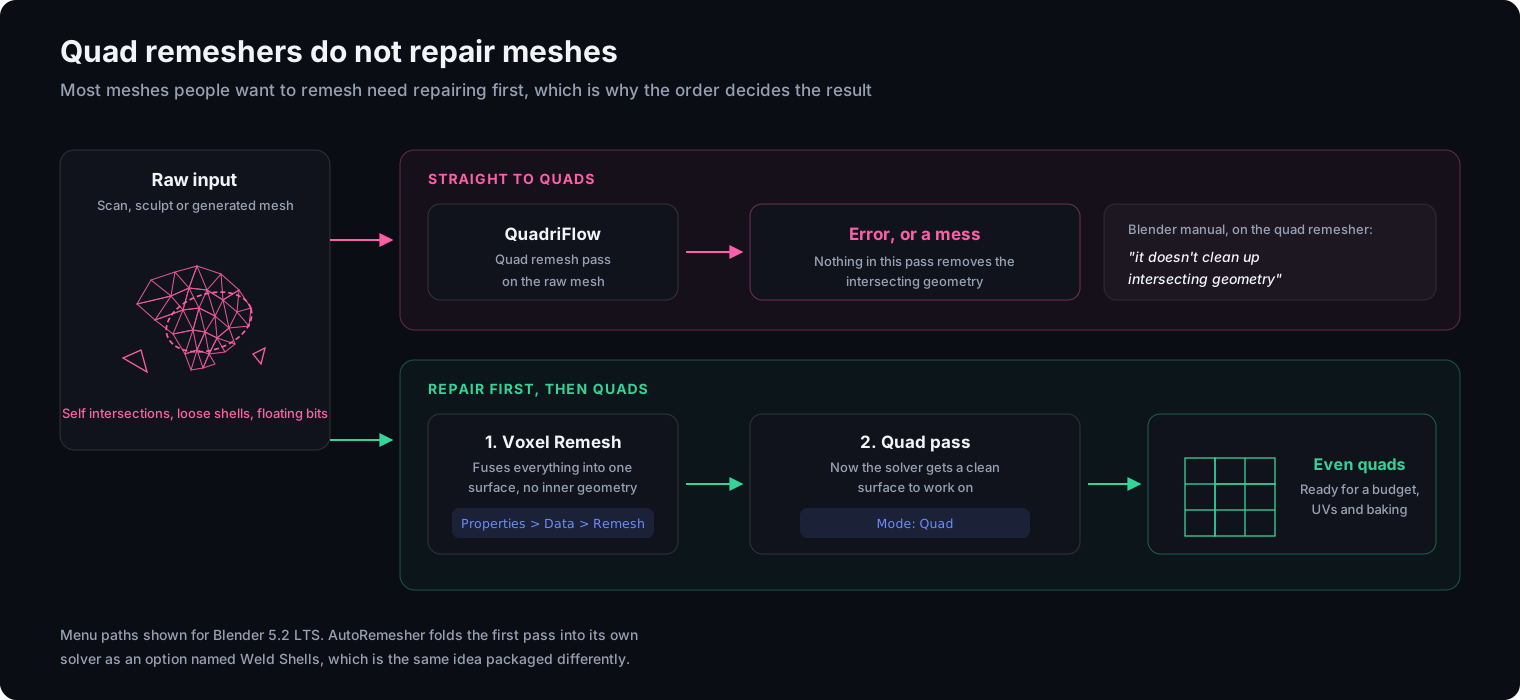
Tool authors clearly know about this trap, because they are building around it. The Blender edition of AutoRemesher ships an option called Weld Shells, described in its documentation as an optional DynaMesh style voxel preprocess that fuses intersecting shells into one watertight surface. That is the first pass above, folded into the tool.
What AI retopology can actually do in 2026
The gap between what is announced and what you can download is unusually wide in this corner of the field right now, so it is worth splitting by availability rather than by capability.
| Project | Status as of August 2026 | What it is |
|---|---|---|
| AutoRemesher | Shipping, free, open source | Standalone quad remesher, with a Blender extension edition |
| Quad Remesher (Exoside) | Shipping, commercial | Add-on for Blender, Maya, 3ds Max, modo, C4D |
| ZRemesher | Shipping, part of ZBrush | Quad remesher with crease and polygroup controls |
| Meshy T2 | Paper published, code not yet released | Native mesh generation that outputs structured topology directly |
| TriFlow | arXiv preprint | Learned topology generation via nearest-vertex vector fields |
| TopGen | arXiv preprint | Combines structural layouts with cross-fields |
Two entries in that table deserve a longer look, because they are the ones being quoted most often and the least precisely.
Meshy T2 is worth understanding because it attacks the problem at the source. Rather than generating a mesh and cleaning it afterwards, it predicts a coarse voxel scaffold and then decodes vertices, connectivity and face winding in a single pass, so the topology arrives structured. The paper, published on 28 July 2026 by the Meshy AI team, reports a median of six seconds for end to end image to mesh generation and three seconds for retopology tasks, and lets the caller specify a vertex budget up front.
That said, the paper and the product are two different things. The repository the paper points to currently contains a README and no code or weights, with a roadmap note dated 3 August 2026 saying an open source release is in preparation. Meshy is a shipping commercial platform, but T2 specifically is a published method whose release has not landed yet.
TriFlow is a research result rather than a product. The preprint, dated 19 June 2026, represents topology as a continuous nearest-vertex vector field and reports a 90% lower Chamfer Distance than prior learning based approaches, along with a roughly eightfold speedup: 31 seconds per sample against 4.3 minutes for TreeMeshGPT. Those are strong numbers. They are also numbers from a preprint that names no conference, so treat citations that assign it to a specific venue with suspicion.
One shipping tool tells the story better than the papers
If you want a single indicator of how fast this area is moving, look at AutoRemesher’s release history rather than any announcement. The public release record shows the project reached 1.0.0-beta.3 in September 2020 and then went quiet for close to six years. Version 1.0.0 finally shipped on 6 July 2026. Versions 1.1.0 and 1.2.0 followed on 16 and 23 August 2026.
A project that was dormant for six years has now published three releases in seven weeks. That is a more reliable signal than any roadmap.
What has not changed
Against all of that, one sentence is worth keeping in view. Blender 5.2, released on 14 July 2026, still tells its users this about topology for a mesh that will be deformed:
no perfect automatic tools exist for this right now; it has to be done manually
That is the current manual of the most widely used 3D application there is, published in the same summer as the results above. The automation is real and the progress is fast. The part that has not fallen yet is the part where topology has to encode intent rather than approximate a surface.
Why auto-retopology loses your sharp edges
Run a quad remesher on a mechanical part and the crisp corners come back softened. The reason is structural rather than a matter of settings being too low.
Most quad remeshers steer their output using a cross-field, a set of directions computed across the surface that tells the solver which way the quads should run. A cross-field is a soft constraint. The TopGen preprint puts it plainly: cross-fields act only as soft constraints and inherently struggle to resolve geometric discontinuities such as sharp edges and corners, which results in jagged boundaries and a loss of critical geometric detail.
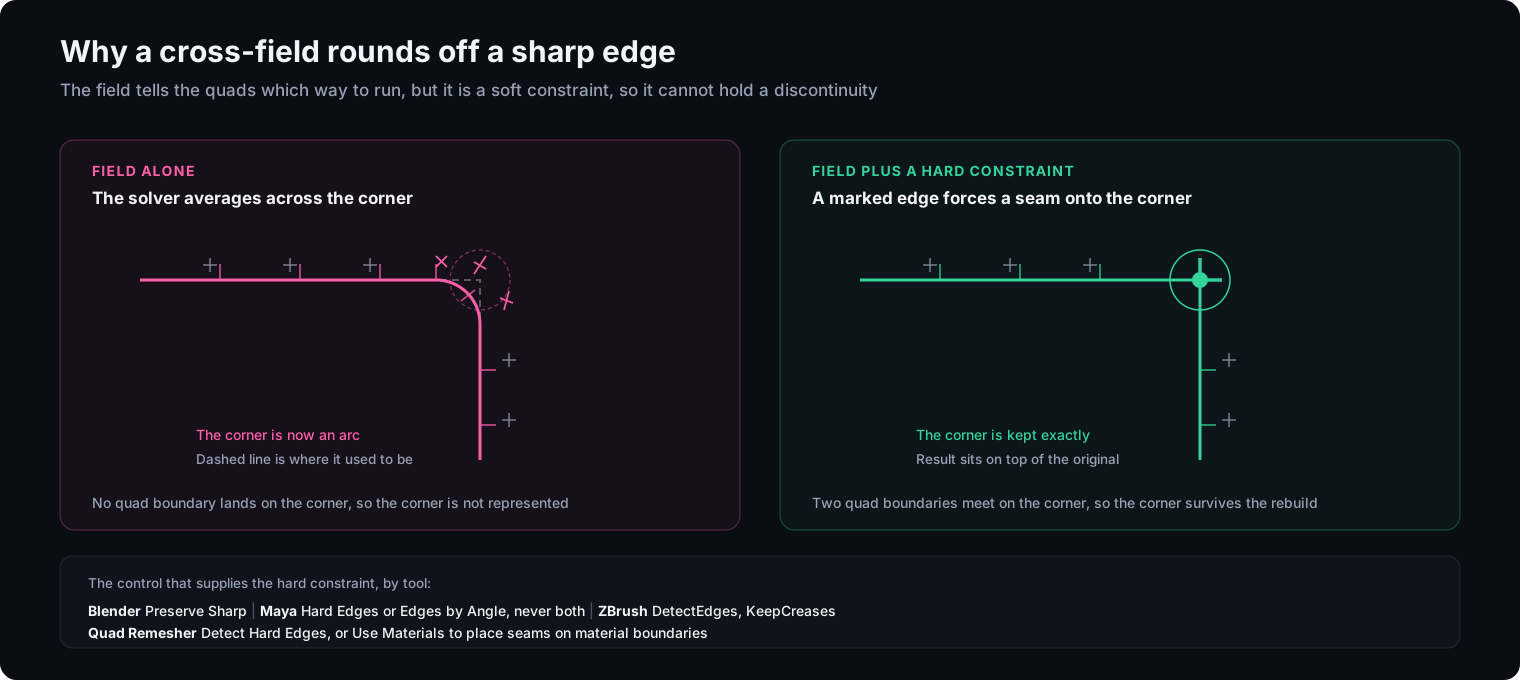
Since the field cannot enforce a discontinuity, the answer is to give the solver something that can. Every serious tool exposes a hard constraint of some kind, and the names differ enough to be worth listing.
| Tool | Control | Where it lives |
|---|---|---|
| Blender QuadriFlow | Preserve Sharp | Properties > Data > Remesh, in the Quadriflow Remesh dialog |
| Maya | Hard Edges, Edges by Angle, Component Tags | Retopologize Options, under Settings > Feature Preservation |
| ZBrush ZRemesher | DetectEdges, KeepCreases, KeepGroups, FreezeBorders | ZRemesher panel |
| Quad Remesher (Exoside) | Detect Hard Edges, Use Materials, Use Normals Splitting | Quad Remesher panel in the host application |
One note on reading that table. Quad Remesher’s Use Materials is not a materials feature in the way the name suggests. It makes the solver detect material boundaries, which turns assigning different temporary materials to adjacent flat panels into a way of telling it where you want supporting loops. Detection has an angle tolerance in every one of these tools, so a shallow bevel may fall under the threshold and need marking by hand.
Before reaching for any of these, check one thing that costs nothing: whether the edge is actually gone. Smooth shading across a preserved corner reads as rounded to the eye even when the geometry is intact. Switch to flat shading or turn on the wireframe before concluding the solver ate it.
Where this leaves you
The useful mental model is not “clean meshes are good, messy meshes are bad”. It is that topology is a cost you pay for a specific capability, and paying it when you do not need the capability is just cost.
Printing does not need it. A one off render usually does not. A prop that never moves needs a polygon budget, not edge flow, and a quad remesher supplies that in seconds. A character that has to bend at the shoulder needs decisions a solver cannot make yet, and Blender’s manual is still saying so in 2026.
The one piece of process worth internalising is the order. Repair, then remesh. Almost every “this tool is useless” verdict on a scan or a generated mesh is a first pass that was asked to do the second pass’s job.
If the goal is only a smaller file rather than better topology, remeshing is the expensive way to get there: decimation and the alternatives are measured here, including how far each one moves the surface in millimetres. And before running either pass, it is worth checking the model in a viewer that reports shell count and non-manifold edges separately, since the two defects need different fixes. Our online STL viewer does that in the browser without uploading the file.
Frequently asked questions
Do I need to retopologize a model before 3D printing it?
Almost never. A slicer builds each layer by intersecting the mesh with a horizontal plane and joining the resulting line segments into closed polygons, so quads, edge loops and polygon distribution never enter the calculation. What it needs is a surface that encloses a volume unambiguously. Blender's own manual lists cleaning a mesh for 3D printing under the Voxel remesher, and explicitly does not recommend the quad remesher for that job.
What is the difference between remeshing and retopology?
Remeshing is automatic and rebuilds the mesh with uniform topology; retopology in the strict sense is the manual process of building a new mesh over the original so the edges follow the form. Blender's manual keeps them as separate sections for this reason. Most tools people call auto-retopologizers are quad remeshers: they produce quads, but they do not decide where a shoulder needs a loop.
Why does auto-retopology round off the sharp edges on hard surface models?
Most quad remeshers steer their output with a cross-field, and a cross-field is a soft constraint. The TopGen paper states that cross-fields inherently struggle to resolve geometric discontinuities such as sharp edges and corners, which shows up as jagged boundaries and lost detail. The fix is to give the solver a hard constraint instead: marked hard edges, creases, material boundaries or guide curves, depending on the tool.
Can AI retopology replace manual retopology in 2026?
For static props, scans and background assets it largely already has. For anything that deforms it has not. The useful test is what the tools themselves claim: Blender's 5.2 manual still states that no perfect automatic tools exist for deformation topology right now and that it has to be done manually. Several of the most discussed AI systems are preprints whose code has not been released yet.
Why does QuadriFlow fail or produce a mess on my 3D scan?
Because the quad remesher does not clean up intersecting geometry, which is exactly what raw scans and generated meshes are full of. Blender's manual says this directly and points to the Voxel remesher for that job instead. The working order is to fuse the mesh into one clean surface first, then run the quad pass on the result.
Does retopology keep my UVs and textures?
No. New topology means new UV coordinates, so the original UV layout and material assignments do not survive. This is expected rather than a failure: the standard pipeline is to unwrap the new mesh and bake the detail from the original high resolution version onto it as normal and colour maps.