Can You 3D Print a GPT-6 Astra Model? We Measured 1,304 Files
Published 2026-09-24

GPT-6 Astra can drive Blender well enough to build a model from a sketch, and OpenAI’s launch film ends with one coming off a printer. Whether the file survives the trip is the part nobody seems to have measured. Plenty of articles warn that it might not; none we could find says what is actually in the file.
So we collected every public file we could find that is presented as Astra output, 1,304 in all, and measured them.
Which files, and how sure is it that Astra made them?
GPT-6 Astra is OpenAI’s model released on 2026-09-03. It does not output a mesh: it operates Blender, writing and running Blender Python that places primitives, applies modifiers and exports a file. Anything published as “an Astra model” is therefore a Blender file built by an agent, and the evidence that Astra was that agent varies a lot:
| Source | What it is | Files | Evidence it is Astra |
|---|---|---|---|
| kingy.ai tutorial | A survey rover before and after one edit, and a spacecraft | 3 GLB | Strong for the rover: the package ships the Codex run settings, model: gpt-6-astra. Author’s statement for the spacecraft |
| GPTBlender demo | A furnished house built from a floor plan | 1 GLB | Publisher’s statement, with SHA-256 checksums that match. Six furnishings are human-made BlenderKit assets and are excluded below |
| Emergent Mind | ”STEM 3D Models”, 26 fields of 50, CC0 | 1,300 STL | Unverified. “Created by GPT-6 Astra” appears only in a Hacker News submission title. The page and the README inside the ZIP name no model or pipeline |
We kept the Emergent Mind collection in because it is the only large public set we found that anyone has pointed at as Astra output, and because its publisher makes checkable claims about it. But its numbers below are about that collection, not proof of what Astra does.
What does the geometry look like?
We measured every file with one script, welding coincident vertices at 1e-8 mm before asking any topology question, and converting GLB from metres, as the format requires:
| Model | Parts | Parts closed on their own | Holes / non-manifold edges | Size | Textures |
|---|---|---|---|---|---|
| Rover (Astra, run settings) | 28 | 28 | 0 / 0 | 1630 x 1210 x 1425 mm | none, flat colours |
| Spacecraft (Astra, author) | 14 | 14 | 0 / 0 | 3748 x 620 x 3073 mm | none, flat colours |
| House, Astra-built parts only | 623 | 591 (95%) | 32 parts open | 18.1 x 3.2 x 9.5 m | 16 images, up to 1024 px |
| Emergent Mind, 1,300 STL | 1 each | 1,300 of 1,300 | 0 / 0 in every file | 45.7 to 126 mm | STL carries none |
Four things stand out.
The rover and the spacecraft have no holes at all. Every one of their parts is a closed surface. That is what you would expect from a model built out of Blender primitives: a cylinder that Blender generates is closed before anyone touches it.
The Emergent Mind collection matches its own label, in every file. Each model page promises a “Closed, single-solid mesh”, and all 1,300 are exactly that: one shell, consistently wound, positive volume. The README also lists a size for each model, and every one matches the file within 0.1 mm on every axis. Only 6 files contain any zero-area triangles, 13 in total. Whoever made it, someone merged the parts and set the units before publishing, which is exactly the step Astra’s raw Blender output does not do.
The house is a scene, not a print, so read it per part. Across 623 separate parts, whole-file edge counts mix real gaps with parts that merely touch, which is why the table gives the parts that are open instead: 32 of 623.
In the house, most of the weight is not Astra’s. The file holds 3,460,081 triangles. The parts Astra built account for 255,562 of them, 7.4%. The six BlenderKit furnishings supply the other 92.6%, which is why the published file is 74 MB. Astra’s own parts do carry one real flaw: 17,234 zero-area triangles, 6.7% of its geometry, against 252 in the far larger furniture.
The raw output is published as JSON, produced
by scripts/measure-astra-output.py.
Why can a mesh check call a clean Astra model broken?
Our own first pass reported the rover as wrecked: 9,120 boundary edges, 6,498 non-manifold edges and 12,908 separate shells, on a model that is in fact closed with 28 shells. Nothing was wrong with the file. Two things were wrong with the check, and both are easy mistakes for any checker to make:
- It kept vertices apart whenever their UVs or normals differed. A GLB splits a vertex wherever a UV seam or hard edge runs through it. A checker that only merges fully identical vertices sees every seam as a crack. Topology has to be judged on position alone.
- It read each part in its own local coordinates. Node transforms were ignored, so the parts sat in the wrong places and the size came out as 1480 mm instead of 1630 mm.
The tolerance matters too. At this site’s browser viewer tolerance, a millionth of the model’s longest side, one Emergent Mind file had 8 of its tiny triangles collapse to lines, and the viewer counted their edges as extra faces on a shared edge: “8 non-manifold edges, normals disagree” on a file that is closed. Both our checks are fixed. The general point is the one from the vertex welding benchmark: two tools disagreeing about one file are usually using two tolerances, not seeing two files.
Where does an Astra model actually break?
At the export, and the defaults decide it. We imported the Astra GLBs into Blender 5.2.2 LTS with factory settings and exported them the way a script or a hurried person would:
| Export | Setting | What the slicer reads as the longest side |
|---|---|---|
| STL | Defaults | 1.63 mm |
| STL | ”Scene Unit” ticked | 1.63 mm |
| STL | Scale 1000 | 1630 mm |
The rover is 1.63 m long, modelled at real size in metres, which is Blender’s default unit. STL has no unit at all, and every slicer reads its numbers as millimetres. Blender’s STL exporter defaults to a scale of 1.0 with Scene Unit off, so 1.63 is written as 1.63, and a vehicle becomes a speck. Scene Unit only applies the scene’s unit scale, which is 1.0 in a default file, so ticking it changes nothing. This is the same trap covered in why a model comes out the wrong size, and the unit declarations benchmark shows which formats carry a unit and which leave it to be guessed. Astra at least models at a real size; an image-to-3D generator does not, and its output arrives one or two units across whatever the object is.
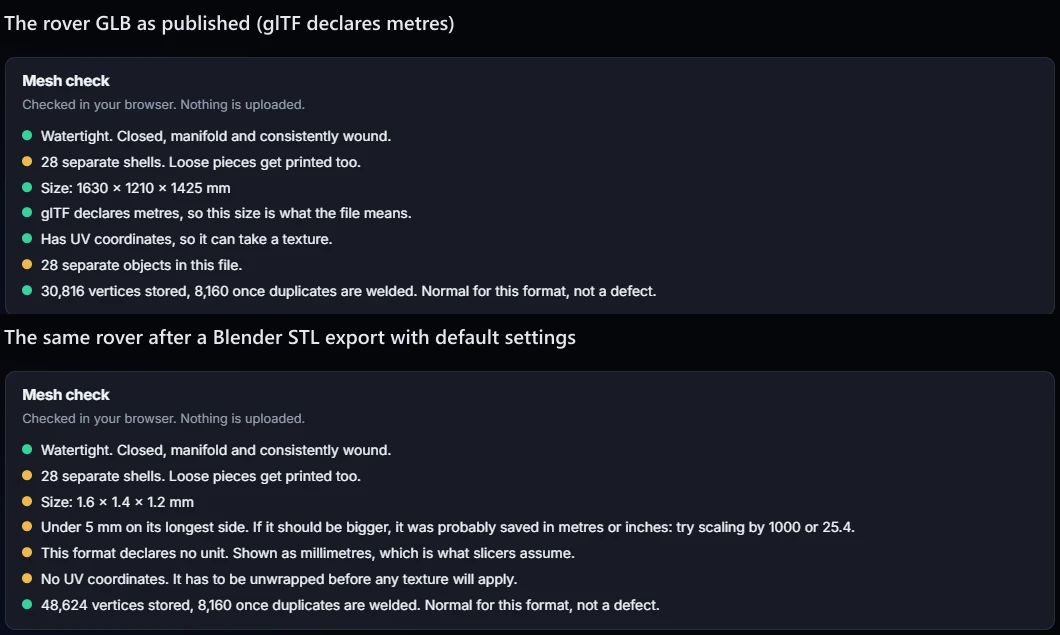
The same rover in this site’s STL viewer, before and after a default STL export.
The second break is glTF. Blender’s glTF exporter defaults to writing every scene, and every object whether visible or not. The published spacecraft already carries the evidence: its file holds a second scene containing nothing but a default cube, 12 triangles that a viewer showing only the default scene, as this site’s does, never draws. Imported into Blender, that cube lands in a collection excluded from the view layer, invisible in the viewport. The author’s own verification file records the reimported GLB as 15 meshes and 4,948 triangles: one mesh and 12 triangles more than the spacecraft has. Export it once more with defaults and the cube lands in the main scene, where every viewer shows it:
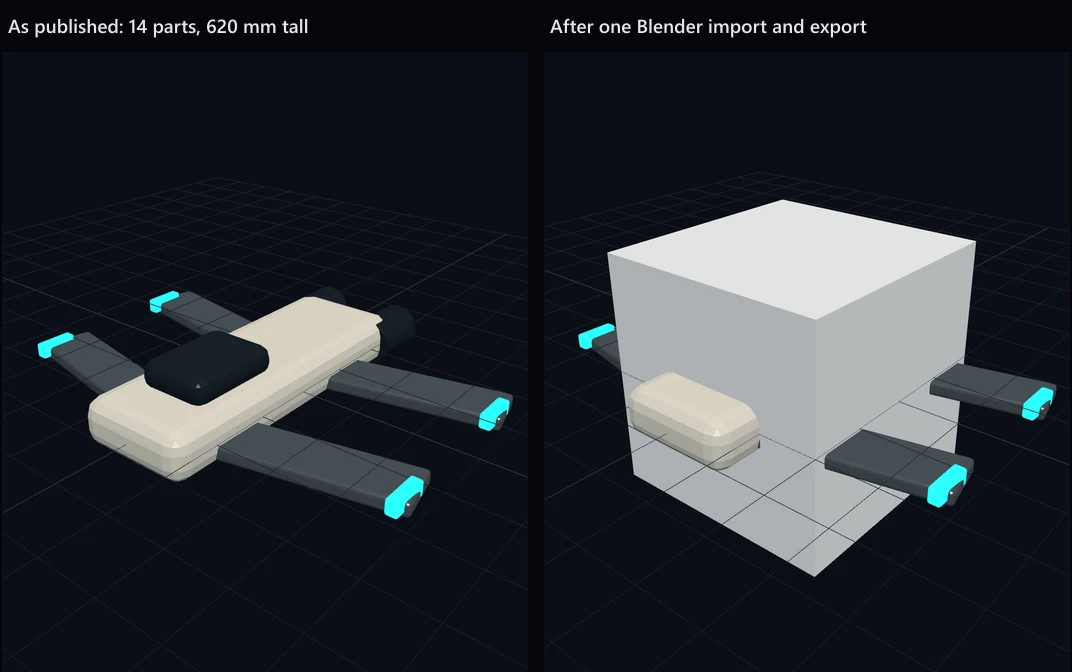
Spacecraft by Kingy.ai, published under the MIT licence. Rendered in this site’s GLB viewer.
The model grew from 620 mm to 2000 mm tall. The likely origin is also reproducible: start Blender, build a model in a new scene rather than the startup one, export with defaults, and the startup cube ships in a second scene. We did exactly that and got the same extra scene.
Modifiers are the third default worth knowing, going by Blender’s documentation rather than a test of ours: the STL export applies them by default and the glTF export does not. A bevel or boolean that Astra left as a modifier would survive an STL export and be missing from a GLB.
Do separate overlapping parts ruin the print?
Not when they arrive in one STL, which is what an STL export of a whole scene produces. A slicer receiving one file with several closed shells treats them as one object. Cura’s “Union Overlapping Volumes” setting merges overlapping volumes inside one model, per UltiMaker’s documentation, and PrusaSlicer loads a multi-shell STL as a single object that can be split into parts on request.
It goes wrong in two narrower cases. The parts are loaded as separate objects and then overlap, which some slicers print twice. Or a shell sits inside another shell with its normals facing the wrong way, which confuses the inside-outside test. Cura’s union has also regressed before: an issue against 5.3.1 reports it failing on an object inside another. We have not sliced these files ourselves, so this is the slicers’ documented behaviour, not our test result.
Where a single solid does matter is anywhere downstream that is not a slicer: a boolean in CAD, a wall thickness check, a collider in an engine. For those, join the parts and run a boolean union in Blender before exporting.
What does the launch demo show, and what does it not?
OpenAI’s launch material includes Blender models among its showcases, and its film, as described by 36Kr, ends with the instruction “Now generate a file that I can send to a 3D printer” and a rocket printing on a Bambu Lab P1S. Two notes from OpenAI’s own page: the clips shown are edited excerpts, and the page does not offer any of the model files. The headline 3D number, 95.9% on BenchCAD against 83.3% for GPT-5.6 Sol, comes from a benchmark of writing CadQuery programs for industrial parts from images and text. It tests CAD code, not whether an exported mesh prints. Nothing on the launch page addresses units, scenes or export settings, which is where the measured problems are.
What should you check before printing an Astra model?
- Ask for millimetres, or scale at export. Tell Astra the model is for printing and to set the scene up in millimetres, or export the STL with a scale of 1000. Do not rely on “Scene Unit”.
- Export the active scene and visible objects only when writing glTF, and apply modifiers.
- Join the parts with a boolean union if the file is going anywhere other than a slicer.
- Open the result before slicing. Drop the STL or GLB into this site’s GLB viewer: it checks watertightness, shells and size in the browser without uploading anything, and it now flags a model under 5 mm as a likely unit mistake. The wider pre-print routine is in how to check a model before printing.
Method and limits
Files were downloaded on 2026-09-23 and verified against the publishers’ checksums where one was offered. Geometry was measured with trimesh 5.1.0 through scripts/measure-gen-mesh.py; the Blender tests ran headless in Blender 5.2.2 LTS on GLB inputs only, never on third-party .blend files, which can run scripts when opened.
Not measured here: self-intersecting faces (the tool that counts them would not load on our machine, so the field is empty rather than zero), physical prints, slicer runs, engine imports, and whether the Emergent Mind collection was made by Astra.
The raw output is published as JSON, produced
by scripts/measure-astra-output.py.
Frequently asked questions
Can you 3D print a model made by GPT-6 Astra?
Usually, once it is exported correctly. The models we could trace to Astra were closed part by part, with no holes and no non-manifold edges. What goes wrong is the export: Astra builds in Blender at real size in metres, and Blender's STL export writes those numbers without converting them, so a 1.63 m rover reaches the slicer as a 1.63 mm speck. Export at a scale of 1000, or scale it in the slicer, and check the size before you print.
Are GPT-6 Astra STL files watertight?
The ones we measured were. The three Astra models with a traceable origin were closed on every part, and all 1,300 files in a public collection presented as Astra output were closed single solids. Watertight is not the same as one piece, though: Astra's own Blender scenes are separate closed parts that overlap, which a slicer merges when they arrive in one STL.
Why is my GPT-6 Astra model tiny in the slicer?
Because it was modelled in metres and exported to STL without a scale factor. STL has no unit, so every slicer reads the numbers as millimetres. Blender's STL exporter defaults to a scale of 1.0 with Scene Unit off, and in our test turning Scene Unit on did not help: the rover still came out at 1.63 mm. Setting the export scale to 1000 gave the correct 1630 mm.
Why did a cube appear in my model after exporting it from Blender?
Blender's glTF exporter writes every scene and every object, visible or not, by default. A published Astra spacecraft carried a stray default cube in a second scene that viewers never show. After one import and export through Blender with default settings, that cube was in the main scene, and the model grew from 620 mm to 2000 mm tall. Tick the options to export only the active scene and only visible objects.
Does GPT-6 Astra make STL or GLB files itself?
No. Astra operates Blender, writing and running Blender Python that builds the scene, and Blender writes the file. That is why the file's problems are Blender export problems rather than generation problems, and why the fixes are export settings rather than prompts.
Where can I download 3D models made by GPT-6 Astra?
Few public files exist, and their provenance varies. The strongest is a kingy.ai tutorial package whose survey rover ships with the Codex run settings naming gpt-6-astra. A GPTBlender house on GitHub is stated as Astra output and checksummed, though six of its furnishings are human-made BlenderKit assets. Emergent Mind's 1,300 free STL files were presented as Astra output in a Hacker News title, but the publisher does not say how they were made.