Repairing an AI-Generated Model: Which Fixes Work, and Which Make It Worse
Published 2026-10-23

In our test of 16 AI-generated models, one repair made every model watertight and left four of them exactly as hollow as before. So what does fix a generated model? We took the nine most useful models from that test, seven with a defect and two healthy ones as controls, and ran six repairs on each.
What we repaired, and how
The models come from the earlier test, scaled to 80 mm and turned the way a slicer receives them. Each has one known problem:
| Model | Generator | Problem |
|---|---|---|
| Pumpkin, mug, charger, figurine | TRELLIS.2 | Hollow: two surfaces 0.15 to 0.16 mm apart, nothing inside |
| Mug | Stable Fast 3D | Opening sealed: the mug is solid |
| Figurine | Hunyuan3D-2.1 | A 0.47 mm sheet under the figurine, fused to it |
| Figurine | Neural4D | 8 open edges and a second shell |
| Mug, pumpkin | Hunyuan3D-2.1 | None: the controls |
The author of this site works for the company that makes Neural4D. Its model went through the same repairs and the same script as the others, and it appears in the tables but not in the pictures.
The six repairs:
- Windows repair service, the one PrusaSlicer calls when you choose “Fix through the Netfabb”.
- Fill holes in the trimesh library, standing in for the hole filling every mesh tool has.
- Make Manifold from Blender’s 3D Print Toolbox 1.5.0, at its default settings.
- Voxel remesh in Blender, at 0.5 and 1.0 mm. It rebuilds the surface as the outside of a block of small cubes, which is how a skin can become a solid. On the hollow models we also tried 1.5, 2 and 3 mm.
- Repair, then remesh: the Windows result remeshed.
- Solidify in Blender, 1.2 mm inwards at default settings: three lines of a 0.4 mm nozzle added behind every surface.
Every result was measured the way the earlier test measured the originals: closed or not, how solid, the thinnest wall, what PrusaSlicer 2.9.6 made of it, and how far the surface moved. The last one is what tells you a repair made things worse.
Hollow skins: closing is not filling
Here is the TRELLIS.2 mug cut through the middle, as generated, after the Windows repair, and after a 1 mm voxel remesh:
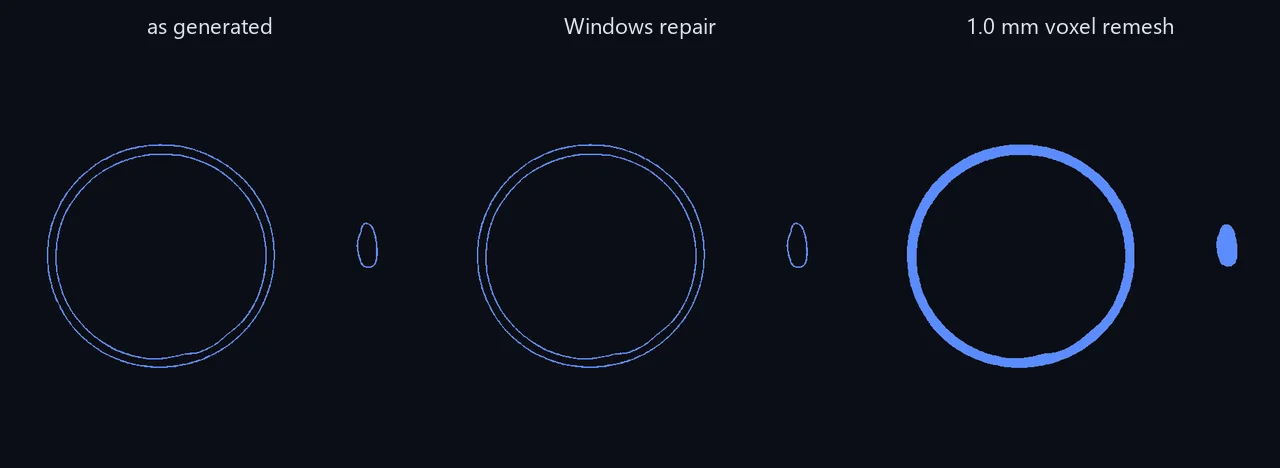
The three one-click repairs left the hollow models as hollow as before. None came out more than 3.9% solid, and some did not even come out closed:
| TRELLIS.2 model | As generated | Windows repair | Make Manifold | Fill holes |
|---|---|---|---|---|
| Pumpkin | 1.32 m, not closed | 1.31 m, closed | 1.32 m, closed | 1.32 m, not closed |
| Mug | 0.49 m, not closed | 0.49 m, closed | 0.49 m, not closed | 0.49 m, not closed |
| Charger | 0.98 m, not closed | 0.60 m, closed | 0.61 m, closed | 0.50 m, not closed |
| Figurine | 0.78 m, not closed | 0.78 m, closed | 2.43 m, not closed | 0.78 m, not closed |
The metres are PrusaSlicer’s filament estimate. The same objects from the other generators took 5.7 to 23.5 m. Every repaired skin still had walls of 0.15 to 0.16 mm. The charger’s starting figure is not stable either: the same file sliced to 0.50 m in the earlier test. With 401 open edges its inside is undefined, and the slicer did not give the same answer twice.
A voxel remesh is what fills them, when it works. At 1 mm, about 1/80 of the model’s size:
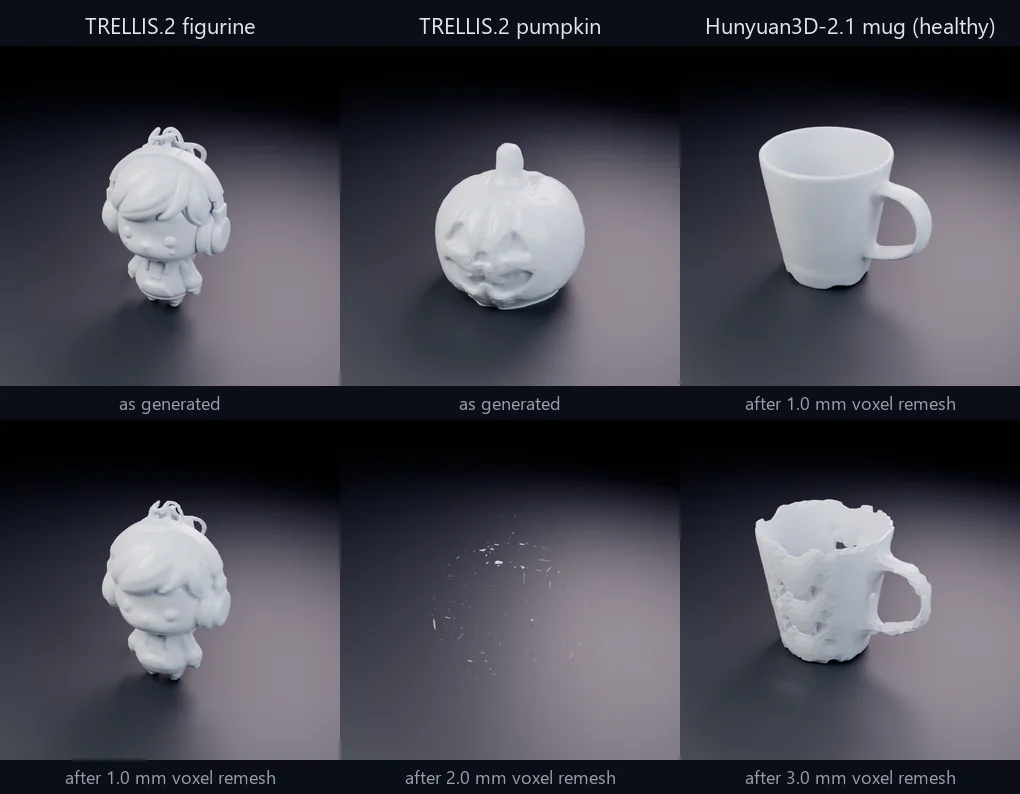
- Mug: one solid shell with a 1.9 mm wall and its handle hole intact: a real mug, at 9.65 m of filament. The healthy Hunyuan3D-2.1 mug takes 11.26 m.
- Charger: solid, 14.36 m.
- Figurine: solid, 8.56 m, but with some detail lost. 99% of its surface stayed within 3.9 mm of where it was, against 0.55 mm when we compared the original with itself.
- Pumpkin: broke into 2,091 pieces, and PrusaSlicer refused it: “There is an object with no extrusions in the first layer.”
The size matters. At 0.5 mm the mug broke into 8,176 pieces instead. The pumpkin never worked: at 0.5, 1, 1.5, 2 and 3 mm it came out in 9,667, 2,091, 718, 338 and 102 pieces, with nothing inside any of them.
Repairing first did not help the remesh. Remeshing the Windows repair’s output gave the same solidity as remeshing the original on every model, and the pumpkin shattered just the same.
Solidify is a partial fallback. It added material to all four skins, 10.7 to 16.3 m of filament including 16.31 m for the pumpkin, the only repair that gave the pumpkin more than a few centimetres. It also kept the shape: 99% of the original surface stayed within 1 mm. But none of the four came out closed, the figurine ended up in 91 pieces, and parts of the charger were still 0.16 mm thick. PrusaSlicer sliced them, but read that as a model it can print, not a model that is right.
Defects no repair fixed
The sealed mug. Stable Fast 3D’s mug is solid where the cavity should be, and it is watertight, so the one-click repairs saw nothing wrong with it. Every repair except Solidify left it 85% solid. Solidify hollowed out the inside to a 1.2 mm shell, but the top stayed sealed, so it would print as a closed box shaped like a mug. A repair cannot find a cavity that is not in the file. Regenerate it.
The sheet. The 0.47 mm sheet under the Hunyuan3D-2.1 figurine is part of the same closed shell, so every one-click repair kept it. A 1 mm remesh split it off as a separate floating piece, which PrusaSlicer flagged as “Floating object part”. Repairing first and then remeshing left a file PrusaSlicer would not slice at all. Delete the sheet by hand in Blender: select a face on it, select linked, delete. Then repair.
Holes: one tool closed them
Neural4D’s figurine had 8 open edges. The Windows repair service closed it, and Repair then remesh at 1 mm also merged its two shells into one. Fill holes, Make Manifold and both remeshes on their own left it not closed. Of all seven models with a defect, only the Windows repair, alone or followed by a 1 mm remesh, produced a closed file every time. Make Manifold closed this figurine’s eight open edges but left two non-manifold ones, so its file was still not closed.
The controls: when repair makes it worse
On the two healthy models, the three one-click repairs and remeshes of up to 1.5 mm stayed within our measurement noise for shape and within 1% for filament. Larger changes were another matter:
- A 3 mm remesh opened 14 extra holes through the healthy mug’s wall, thinned it to 0.6 mm in places, and moved 99% of its surface by up to 2.5 mm. At 2 mm the same mug still came through intact.
- Solidify turned the solid Hunyuan3D-2.1 pumpkin into a 1.2 mm shell: from 93% solid to 10%, and from 23.53 m of filament to 8.16 m. That can be useful, a hollow print is cheaper, but it is a change to the object, not a repair.
So repair a model only when you know what is wrong with it, and check the result.
Which fix for which problem
- Diagnose first. Open the model in our GLB or STL viewer: it reports holes, shells and size. Slice it and compare the filament with what the object should take: a few percent means a skin.
- Holes or loose shells: a one-click repair. The Windows service, as PrusaSlicer's Fix through the Netfabb, produced a closed file for all seven damaged models.
- A hollow skin: voxel remesh at about 1/80 of the model's size, then cut it in half to check the inside is filled. If it shatters, try Solidify, or regenerate.
- An extra sheet or slab: delete it by hand before any other repair.
- A sealed opening: regenerate. No repair adds a cavity that is not in the file.
- A healthy model: leave it alone. Large voxel sizes and Solidify change healthy models too.
The general walkthrough of each repair tool is in how to repair an STL file. Deciding between fixing and starting again is in repair or rebuild. If the model is too big for your printer, repair before you cut: our cutting test found every cutting method carried an open model’s holes into the pieces. The order of repair steps matters for ordinary files too, which we measured in our repair order benchmark.
Method
The nine models are the 80 mm copies from our generated-model baseline, generated between 2026-09-24 and 2026-10-15. Blender 5.2.2 ran the Blender repairs headless. The Windows repair results are the same files as in the baseline. Each result was measured with trimesh, and sliced with PrusaSlicer 2.9.6 at its default profile. Surface movement is the distance from 60,000 points on one surface to the nearest of 60,000 points on the other, in both directions. Two samplings of the same unrepaired model differ by 0.53 to 0.74 mm at the 99th percentile, so read every figure against that. Nothing was physically printed. Every reading and the voxel size sweep are in the data.
The raw output is published as JSON, produced
by scripts/measure-gen-repair.py.
Frequently asked questions
How do I fix an AI-generated STL for 3D printing?
Find out what is wrong first, because the fixes are different. Holes and loose pieces: a one-click repair such as PrusaSlicer's Fix through the Netfabb closes them. A hollow skin (the model slices to a fraction of the filament it should): a voxel remesh at about 1/80 of the model's size filled three of our four. A sealed opening or an extra sheet: no automatic repair fixes those; delete the sheet by hand and regenerate the sealed model.
Why is my AI-generated model hollow in the slicer?
Some generators return every surface as two thin layers with nothing between them. All four TRELLIS.2 models we tested were built this way, about 0.16 mm thick at an 80 mm print size. The slicer prints what is there, so the model comes out at a few percent of its proper filament. A one-click repair can make it watertight but leaves it hollow.
What voxel size should I use to remesh an AI model?
In our tests, about 1 mm on an 80 mm model, roughly 1/80 of its size, worked best: it filled three of four hollow models and changed two healthy models by no more than our measurement noise. 0.5 mm broke one hollow mug into thousands of pieces. 3 mm damaged a healthy mug, opening 14 holes in its wall. Check the result in a cross-section and the slicer's filament figure.
Does Blender's Make Manifold fix AI-generated models?
Partly. The 3D Print Toolbox's Make Manifold closed two of four hollow TRELLIS.2 models and left the other two open, and it filled none of them. On a Neural4D figurine it closed eight open edges but left two non-manifold ones, so that file was still not closed. The Windows repair service behind PrusaSlicer's Fix through the Netfabb produced a closed file for all seven damaged models we tried.
Should I repair or regenerate an AI-generated model?
Regenerate when the defect is in the shape rather than the surface. A mug with its opening sealed solid has no cavity for any repair to find, and one of our hollow pumpkins broke apart under every voxel size from 0.5 to 3 mm. Repair is worth it for holes, loose pieces and most hollow skins.