Canon Dual Pixel 3D: What's in the File, and How to Print One
Published 2026-10-12
Canon released Dual Pixel 3D Converter on October 8: a free Windows program that turns one photo from a supported Canon camera into a textured 3D model. The first reviews are about how it looks. We wanted to know whether the file is any use once you leave the viewer, so we measured nine of its exports and tried to print them.
What the converter exports
The converter reads a Dual Pixel RAW photo, uses the slight difference between the two halves of each pixel to estimate depth, and writes an OBJ or GLB with the photo as its texture. It needs a supported EOS R body and lens. immerNews tested it the day after release, with photos by Vlad Rex, and published nine of the GLB exports. We do not have a supported camera, so those nine files are what we measured. immerNews already covers what they look like, how the triangles and texture are stored, and how the result compares with an AI image to 3D generator. We only looked at the question it leaves open: what happens when you try to print one.
The nine are eight exports with the background removed (an angel, a doll, a flower, pumpkins, a statue, and a potted plant at three depth settings) plus the same plant with its background kept.
The raw output is published as JSON, produced
by scripts/measure-canon-dp3d.py.
What we found in nine exports
| Export | Triangles | Closed solid | Separate pieces | Zero area triangles | Size (mm) |
|---|---|---|---|---|---|
| Angel | 17,306 | No | 309 | 488 | 197 x 284 x 153 |
| Doll | 34,991 | No | 946 | 1,328 | 250 x 449 x 191 |
| Flower | 10,976 | No | 431 | 744 | 204 x 160 x 131 |
| Plant, depth 0.5 | 18,448 | No | 744 | 1,184 | 126 x 130 x 38 |
| Plant, depth 1 | 28,192 | No | 744 | 1,184 | 128 x 134 x 77 |
| Plant, depth 2 | 45,734 | No | 743 | 1,182 | 134 x 141 x 153 |
| Plant, background kept | 58,324 | No | 3 | 4 | 323 x 202 x 96 |
| Pumpkins | 42,462 | No | 795 | 1,241 | 613 x 454 x 324 |
| Statue | 12,597 | No | 329 | 512 | 223 x 397 x 154 |
Sizes are width x height x depth, with glTF’s metres converted to millimetres. Three things stand out, and each needs a different fix.
It is a relief, not an object
A single photo only shows one side of a thing, and the converter does not guess the rest. Every export is a curved sheet: the visible surface of the subject, with its edge running along the outline of what was photographed. From behind, there is nothing.
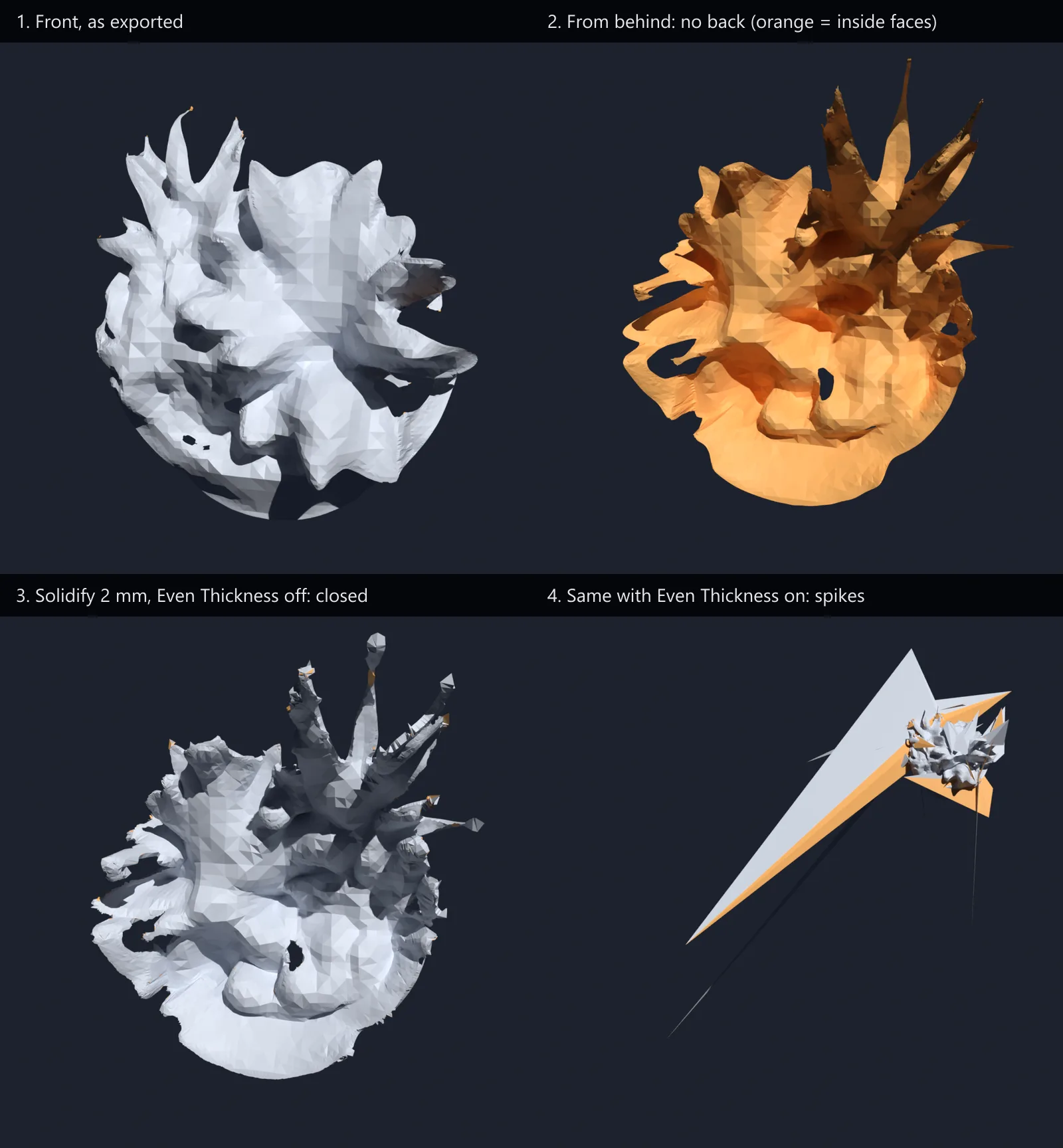
A slicer needs a closed volume to know what is inside. Given the sheet, PrusaSlicer 2.9.6 reported the model as not manifold, with 1,448 to 3,867 open edges depending on the file, and when we asked it to slice the plant it wrote no G-code at all, stopping with “There is an object with no extrusions in the first layer”. The sheet stands on an edge, and an edge has no area to print.
That is a property of single photo capture, not a bug. It also means that cleaning the file up is not enough: we removed every loose piece from the plant and sliced it again, with the same result.
Where the hundreds of pieces come from
The background removed exports carry 309 to 946 separate pieces each. The same plant photo with its background kept has 3. The pieces come from cutting the subject out of the photo.
They are made of triangles with no area: three corners on a line, or two corners in the same place. The exports hold 488 to 1,328 of them, in line with what immerNews found in its sample, along the outline of the subject. Removing those triangles alone takes the count from 309 to 946 pieces down to between 1 and 23. PrusaSlicer deletes zero area triangles when it loads a file, and reported removing exactly that number from each. When we did the same in Blender, four of the nine were one piece, four had between 3 and 10, and the doll had 23.
Most of what remains is still debris: small pieces we dropped by the rule our STL splitter uses: anything under 1% of the model’s size, or a loose sheet holding under 0.5% of its triangles. After that, seven files are one piece, and the splitter gets the same result in your browser once the model is exported as STL. The doll kept a small second piece, and the flower kept two large ones; immerNews’ name for that file, “flower artifact”, suggests the split is a flaw of the capture rather than two flowers.
The depth is a dial, not a measurement
The converter has a depth setting, and immerNews exported the plant at three values. The depth of the model follows it exactly:
| Depth setting | Width (mm) | Height (mm) | Depth (mm) |
|---|---|---|---|
| 0.5 | 126 | 130 | 38 |
| 1 | 128 | 134 | 77 |
| 2 | 134 | 141 | 153 |
Doubling the setting doubled the depth to within a fraction of a millimetre, while width and height moved by a few percent. So how deep the model is depends on the setting you chose, not on the plant. Before printing, decide how thick the relief should be and scale the depth axis on its own if needed.
Width and height are a different matter. They come out in plausible sizes for the objects, a 13 cm plant and a 45 cm doll, which is more than an AI image to 3D generator gives you: the ones we measured put every model at 1 or 2 units regardless of subject. We could not check them, though. We have no measurements of the objects that were photographed. Treat the size as a starting point and check one dimension you know.
How to make one printable
We tried the two obvious fixes on all nine files, in Blender 5.2.2, and checked each result with PrusaSlicer’s own model report and by slicing the plant.
Solidify gives a surface a thickness, so that a sheet becomes a thin closed shell. At 2 mm, with Rim Fill on:
- Eight of the nine came out as closed solids: one piece each, apart from the flower’s two.
- The doll did not: its shell was left with 8 open edges. A slicer’s automatic repair may well close a gap that small, but we did not confirm it.
- No vertex moved further than the 2 mm thickness.
- The plant sliced in PrusaSlicer with default settings to an estimated 3 hours 26 minutes and 13.1 m of filament.
Voxel remesh rebuilds the shape from scratch as one closed volume, which is the usual fallback when a mesh will not repair. Applied after Solidify at 0.5 mm, it closed all nine, the doll included, and the plant sliced to a similar print. But the files grew from 1.2 to 6.2 MB after Solidify to between 11 and 350 MB, and in seven of the nine the remesh split off a few small separate pieces of its own. For these models it is a last resort, not the default.
So the steps that worked:
- Import the GLB into Blender. It arrives in metres; scale by 1000 if you will export STL, or it reaches the slicer 1000 times too small.
- Add a Solidify modifier: thickness 2 mm or more, Rim Fill on, Even Thickness off.
- Export STL and load it in your slicer. Check it reports a single closed object before printing; our pre-print checklist goes through the order.
If you want it in a game engine or AR instead
The open back matters there too, differently. immerNews found that the converter’s GLB material is single sided, so the model vanishes when viewed from behind, and that the full resolution photo is stored as the texture even though the subject covers a small part of it. Both are easy to change in Blender before export. What a GLB file can carry and what each engine does with it is covered separately.
Method
The nine GLB files are immerNews’ exports from Canon Dual Pixel 3D 1.0.0.13, downloaded from the link in their article; input photos and exports by Vlad Rex. We did not run the converter ourselves and the files are not redistributed here. Geometry was measured with the same script as our other generated mesh data. The fixes were scripted in Blender 5.2.2 so every step is repeatable, and each result was checked with PrusaSlicer 2.9.6’s model report and, for the plant, a slice with default settings. Nothing was printed. The full results, the exact settings and the list of what we did not measure are in the raw data linked above. This piece sits in our mesh repair guide.
Frequently asked questions
Can you 3D print a model from Canon Dual Pixel 3D Converter?
Not as exported. In the nine exports we measured, every model was an open surface showing only the side the camera saw, with no back, and PrusaSlicer 2.9.6 refused to produce G-code for one, reporting no extrusions in the first layer. After giving the surface a 2 mm thickness with Blender's Solidify modifier, eight of the nine became closed solids and the one we sliced came to an estimated 3 hour 26 minute print.
Why does my Canon Dual Pixel 3D model have hundreds of separate pieces?
In the exports with the background removed, the converter leaves hundreds of tiny triangles along the edge of the subject. Most have zero area. In our sample the background removed versions had 309 to 946 separate pieces, while the same plant photo with the background kept had 3. PrusaSlicer deletes zero area triangles itself when it loads a file. When we removed them in Blender, four models were left as one piece, four had between 3 and 10, and the doll had 23.
Is a Canon Dual Pixel 3D model the real size of the object?
The depth is not. The converter has a depth setting, and in our sample the model's depth doubled, to within a fraction of a millimetre, each time the setting doubled: 38, 77 and 153 mm for settings of 0.5, 1 and 2 on the same photo. Width and height barely moved. Whether width and height match the real object we could not check, since we have no measurements of the photographed subjects.
Should I use Even Thickness in Blender's Solidify modifier for a Canon model?
No. On every one of the nine exports, Even Thickness threw between 20 and 330 vertices far out of the model, the farthest from 78 millimetres to over 19 metres away depending on the file. With Even Thickness off, no vertex moved more than the 2 mm thickness. The likely cause is the steep walls the converter builds where depth jumps, whose triangles meet at very sharp angles.
Does it need a Canon camera?
Yes. According to Canon's compatibility list as reported by immerNews, the converter needs a supported EOS R body and RF or RF-S lens, and reads Dual Pixel RAW files. The EOS R8 Mark II can also supply JPEGs with distance data. An ordinary photo from another camera cannot be converted.