What Is a GLB File? How to Open One, Look Inside It, and Convert It
Published 2026-08-07
You downloaded a .glb, double clicked it, and nothing useful happened. The format is everywhere now, in AR, in web stores, in every AI 3D generator’s export menu, and yet almost nothing on a normal desktop opens it by default.
What is a GLB file?
A GLB file is a complete 3D scene stored as a single binary file. Geometry, materials, textures, animations, skinning data and the scene hierarchy all live inside it, which is why one file is enough to hand someone a finished model.
The format underneath is glTF, maintained by the Khronos Group, the same standards body behind OpenGL and Vulkan. glTF is often described as “the JPEG of 3D”, and the comparison is about purpose rather than compression: it is a delivery format, designed to be loaded fast by a renderer, not to be worked in. glTF 2.0 was published as an International Standard, ISO/IEC 12113:2022, and Khronos kept full control of the specification so it can keep evolving (Khronos).
That delivery purpose explains where you meet GLB files. Google’s Scene Viewer uses glTF 2.0 and GLB for AR on Android. Google’s model-viewer web component, the usual way to embed a rotating 3D product on a page, is built around it. Every AI image-to-3d generator offers it. If a 3D model is going to be looked at rather than engineered, it probably travels as a GLB.
GLB vs glTF: what is the actual difference?
They are the same format with different packaging, and the distinction is worth getting right because it decides which one you should ask for.
A .gltf file is JSON. It describes the scene and then points outward at separate files: a .bin for geometry and animation data, plus image files for textures. A model therefore travels as a folder, and a missing texture file means a grey model. The JSON can alternatively embed that binary data inline as base64, which keeps things to one file but inflates the encoded resources by about 33 percent.
A .glb file solves that by wrapping the same JSON and the same binary data into a single binary container, with no base64 padding. That is the whole idea: one file, nothing to lose, no encoding overhead.
.gltf | .glb | |
|---|---|---|
| Structure | JSON plus external .bin and images | One binary container |
| Travels as | A folder | A single file |
| Human readable | Yes, the JSON is editable text | No |
| Size overhead | 33 percent if data is base64 embedded | None |
| Best for | Editing, swapping textures, version control | Sending, publishing, AR, single file delivery |
How do I open a GLB file?
Pick by what you want to do with it. Viewing, editing and inspecting are three different jobs, and the fastest answer is different for each.
To just look at it, with nothing installed. Drop the file into our free GLB viewer. It runs entirely in your browser, so the file never leaves your device, which matters when a client model is under NDA. The same viewer also opens glTF, OBJ, STL and PLY.

The Khronos BoomBox sample opened in our own viewer. The metal antenna, the speaker mesh and the plastic buttons all come from textures packed inside the single GLB file, which is the difference you would see immediately if this were an STL. Model: BoomBox by Microsoft, CC0 1.0, from the Khronos glTF Sample Assets. Screenshot: 3D Tool Wiki.
On Windows, without a browser. The built in 3D Viewer app opens GLB on double click. If it is not installed it is a free download from the Microsoft Store.
To edit it. Blender imports GLB through File, Import, glTF 2.0 (.glb/.gltf), and it reads the materials, not just the mesh. This is the route to take when you need to change geometry, rework materials, or export to something else.
To inspect it properly. The Khronos glTF Sample Viewer renders a file against the reference implementation, which is the closest thing to a ground truth for whether a GLB is well formed or your renderer is misbehaving.
What is actually inside a GLB file?
Three parts: a 12 byte header, a JSON chunk, and a binary chunk. Rather than describe that abstractly, here is a real file taken apart, the BoomBox sample from the Khronos asset library.
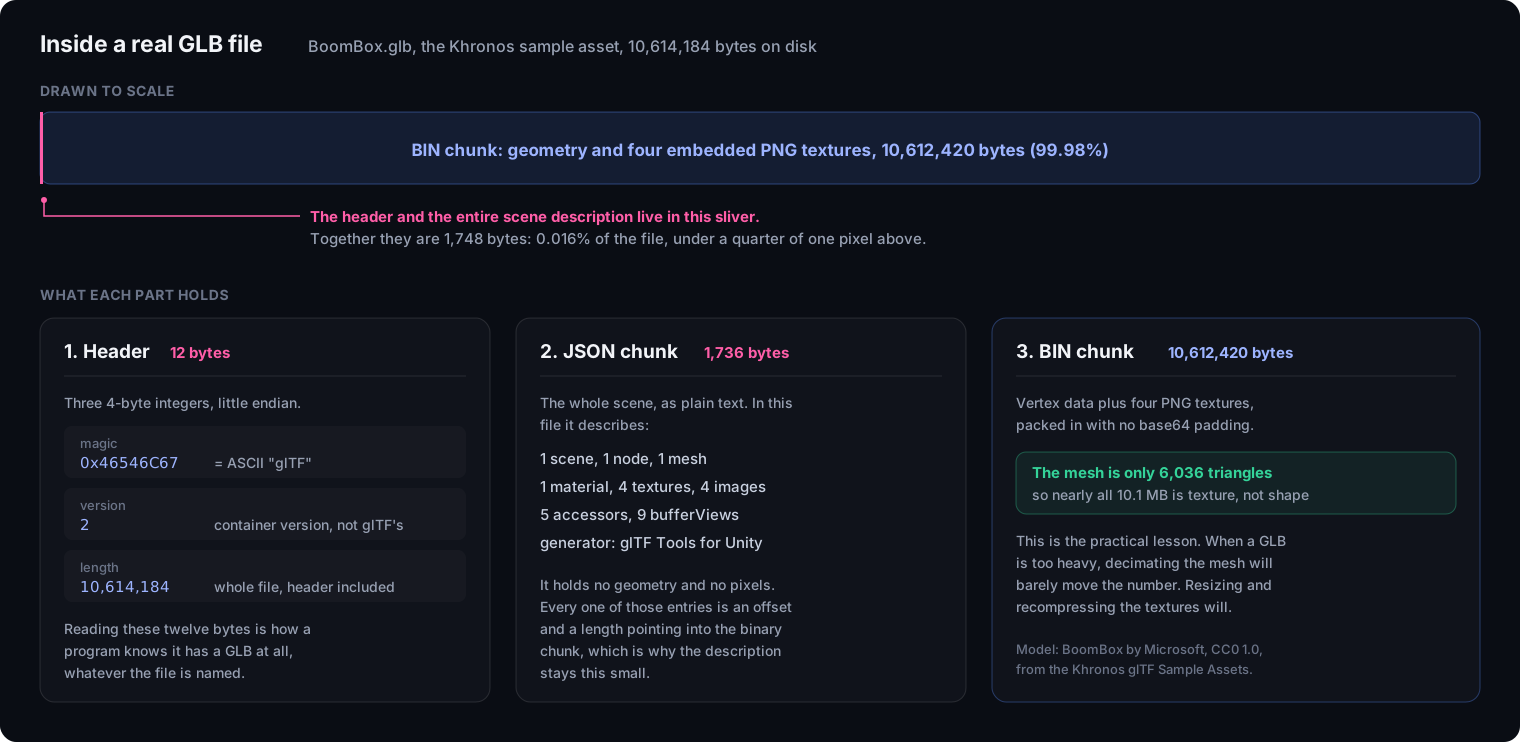
The header is three 4 byte integers: a magic number equal to 0x46546C67, which is ASCII for glTF, the container version, and the total file length. Reading those twelve bytes is how any program identifies a GLB regardless of what the file is called (glTF 2.0 specification).
The JSON chunk holds the entire scene description as plain text, and it is startlingly small: in this file, 1,736 bytes describing one scene, one mesh, one material, four textures and four images. It contains no geometry and no pixels at all. Every entry is an offset and a length pointing into the binary chunk, which is exactly why the description stays this compact.
The binary chunk is everything else, and in this file that is 10,612,420 bytes, or 99.98 percent of it. Chunks must appear in that order, and implementations are required to ignore chunk types they do not recognise, which is how extensions add data without breaking older readers.
Why is my GLB file so big, and what actually shrinks it?
Look at the textures first, because the geometry is rarely the problem. The file dissected above makes the point better than any general advice: the mesh is 6,036 triangles, which is tiny, while the file is 10.1 MB. Nearly all of that weight is four embedded PNG textures.
So decimating the mesh will barely move the number. What works, in rough order of effect:
- Resize the textures. A 4096 by 4096 map on an object that renders 300 pixels wide is pure waste. Google’s Scene Viewer caps texture resolution at 2048 by 2048 anyway (Google).
- Change texture format. PNG is lossless and heavy. JPEG for colour maps, or KTX2 with Basis Universal supercompression, cuts this hard.
- Compress the geometry with Draco or meshopt, which starts to matter once the textures are no longer dominating.
- Only then reduce the mesh.
The practical tool for all of that is glTF Transform, Don McCurdy’s glTF SDK, which has a command line interface that does the whole pass in one go (gltf-transform.dev):
gltf-transform optimize input.glb output.glbIt handles Draco and meshopt geometry compression, KTX2 and WebP textures, deduplication of repeated vertex and texture data, and pruning of anything unused.
How do I convert a GLB to STL for 3D printing?
You have to convert, because no slicer reads GLB. The path most people should take runs through Blender: import the GLB with File, Import, glTF 2.0, then export with File, Export, STL, or 3MF if you want to keep units and per object structure.
Two things to expect. You will lose the materials. STL stores triangles and nothing else, so the colour and texture that made the GLB look finished will not survive; 3MF keeps more, and our guide on 3MF vs STL covers what each format holds. The mesh may not be printable. A model authored for real time rendering has no obligation to be watertight, and frequently is not: open surfaces, zero thickness planes and intersecting parts all render fine and slice badly. Budget time for a repair pass, which our guide on repairing a broken STL walks through.
You can check which of the tools in the directory read and write each format on our format compatibility table.
Why AI 3D generators all export GLB
Every image-to-3d service offers GLB, and usually offers it first. I work in that industry (our About page explains that background and the disclosure that comes with it), and the reason is not fashion.
GLB matches what these systems produce. A generator outputs a mesh plus PBR texture maps, frequently from a separate texturing stage that runs after shape generation. GLB is built to carry exactly that combination in one file, with physically based materials as a first class citizen. STL would throw away the entire texturing stage, which is often the half that makes the output look impressive.
GLB matches where the output is going. The dominant destinations for generated 3D are game engines, web viewers, AR try on and virtual production. Every one of those pipelines already speaks glTF. Printing is a smaller share of that audience, and it is the one destination that needs a different format anyway.
It is honest about what the generator knows. GLB, like glTF, has no strong opinion about real world scale, and a generative model working in a normalised space genuinely does not know how large the object is. A format built around declared physical units would be asking for a number the generator cannot supply truthfully.
What that GLB is good for is narrower than it looks, though, and this is the part vendors do not lead with. A generated mesh is extracted from a volume rather than modelled, so it has no deliberate edge flow. Technical artists evaluating these tools consistently report the same consequence: the topology will not deform cleanly, which rules the file out for rigging and animation without a retopology pass first. The texturing has a matching problem, since lighting is frequently baked into the colour map, and baked shadows fight with real time lighting the moment the object moves under a different light.
So a generated GLB is genuinely useful as a static prop, a background object, or a volumetric stand in while you block out a scene. Treat it as a finished animatable asset and you will discover the gap the hard way.
The practical consequence is a division of labour worth internalising: the GLB is the delivery, and the printable file is something you make from it. Import, repair, scale to real dimensions, then export STL or 3MF.
When is GLB the wrong format?
It is the wrong choice more often than its ubiquity suggests, and knowing when saves a lot of rework.
- For 3D printing. No slicer reads it, and its strengths, materials and animation, are irrelevant to a printer. Use STL or 3MF.
- For CAD and engineering. GLB stores a triangle approximation of a surface. If someone needs to modify a designed part, they need STEP, which stores the mathematical surfaces.
- As a source of truth. GLB is a delivery format. Keep your
.blend, your CAD file or your layered source, and treat the GLB as an export, in the same way you keep the layered file rather than only the JPEG. - For iOS AR. Apple’s AR Quick Look wants USDZ. Cross platform AR generally means shipping both formats.
Used for what it is good at, though, GLB is the least troublesome 3D format in circulation: one file, materials included, opens in a browser, standardised by ISO. For getting a finished 3D model from one person to another, nothing else currently comes close.
Frequently asked questions
What is a GLB file?
A GLB file is a complete 3D scene stored as a single binary file: geometry, materials, textures, animations and the scene structure all packed together. It is the binary form of glTF, a format published by the Khronos Group and standardised as ISO/IEC 12113:2022. The point of GLB over plain glTF is self containment: one file that carries everything, with nothing to lose track of.
How do I open a GLB file?
The quickest way needs no installation: drop it into a browser viewer such as our free GLB viewer, which renders the file locally and never uploads it. On Windows, the built in 3D Viewer app opens GLB by double click. For editing rather than viewing, Blender imports GLB through File then Import then glTF 2.0.
What is the difference between GLB and glTF?
They are the same format with different packaging. A .gltf file is JSON that points at separate .bin geometry files and separate image files, so a model travels as a folder. A .glb file packs that same JSON, the binary data and the textures into one file. Use GLB when a model has to move as a single unit, and glTF when you want to edit the JSON or swap textures without repacking.
Why is my GLB file so large?
Almost always the textures, not the geometry. In the Khronos BoomBox sample the mesh is 6,036 triangles while the file is 10.1 MB, because four PNG textures are embedded in it. Decimating the mesh barely moves that number. Resize the textures first, then compress them, then compress the geometry. The command gltf-transform optimize input.glb output.glb does the whole pass in one step.
Does a smaller GLB file always use less memory?
No, and this catches people out. Textures are decoded into uncompressed bitmaps in GPU memory, and the size of that bitmap depends only on its dimensions, not on the file format. A 2048 by 2048 texture takes roughly 16 MB of video memory whether it arrived as a 200 KB JPEG or a 12 MB PNG, with mipmaps adding about a third more. This is why KTX2 matters even when it does not beat JPEG on disk: it stays compressed in GPU memory. A scene that works on a desktop and crashes a phone is usually hitting this limit.
Can I 3D print a GLB file?
Not directly, since slicers do not read GLB. Convert to STL or 3MF first, which you can do in Blender by importing the GLB and exporting the mesh. Expect to lose colour and materials in STL, and expect the mesh to need checking: a model built for real time rendering has no obligation to be watertight, and often is not.
Is GLB the same as a 3D model file for AR?
On Android, effectively yes. Google Scene Viewer takes glTF 2.0 and GLB, with a recommended ceiling of 10 MB and a hard limit of 15 MB. Apple's AR Quick Look uses USDZ instead, so cross platform AR usually means publishing both, generally by converting the GLB.
How do I know a file is really a GLB?
Read its first four bytes. Every GLB begins with the magic number 0x46546C67, which spells glTF in ASCII. The next two 4-byte integers are the container version and the total file length. A file that fails that check is not a GLB whatever its extension says.