3MF vs STL: What Changes When You Switch, and What Nobody Warns You About
Published 2026-08-04

Every slicer now offers to save your work as 3MF, and Prusa, Bambu and UltiMaker all nudge you towards it. The format genuinely fixes what STL got wrong. It also introduces three problems that the usual comparison articles skip entirely.
What STL actually stores, and what it leaves out
STL stores a flat list of triangles. That is the whole format. It was released in 1987 by 3D Systems as an exchange format for stereolithography, and its design reflects the computing budget of that decade: a binary STL is an 80 byte header, a 4 byte triangle count, then 50 bytes per triangle, repeated until the file ends.
What follows is a list of things the format has no place to put. There is no unit of scale, so the numbers are bare coordinates and the importing program has to assume what they mean. There is no colour and no material. There is no notion of a part, so a model made of five components arrives as one undivided mass of triangles. And nothing prevents a broken mesh from being written, which is why “not watertight” is such a familiar slicer warning.
STL survives anyway, for one reason worth respecting: it is universal. Every mesh tool, every slicer, every printing service reads it. That is a real feature, and it is the only argument for STL that has not weakened over time.
What does 3MF add?
3MF fills in exactly those gaps. Rather than a single stream of triangles it is a zip container holding XML parts, with a required 3D model part and optional parts for package metadata, a print ticket, thumbnails and digital signatures (3MF Core Specification).
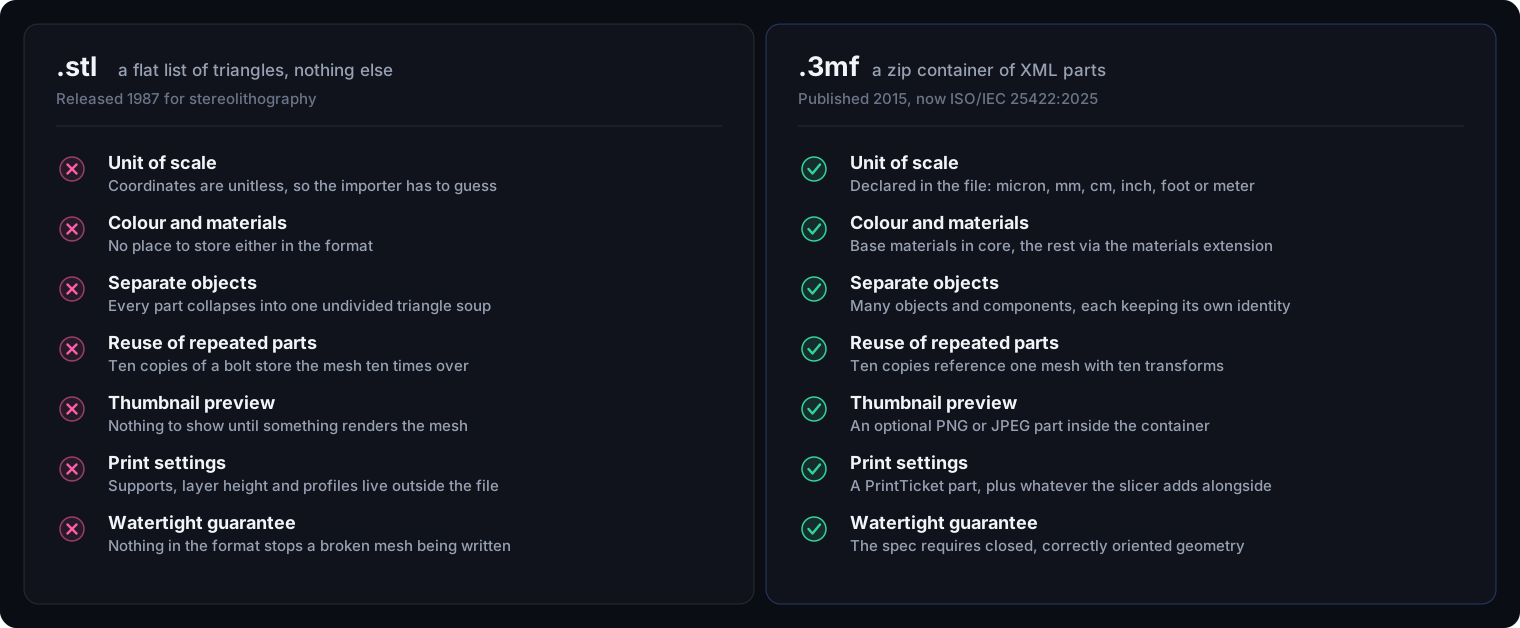
Four of those differences change day to day work:
- Units are declared, not guessed. The model element carries a unit attribute allowing micron, millimeter, centimeter, inch, foot and meter, defaulting to millimeter. Manufacturing service Hubs specifically recommends 3MF to avoid the classic unit mismatch where a part designed in millimetres prints 25.4 times too large (Hubs).
- Repeated parts are stored once. 3MF references a mesh and applies a transform per instance, so ten copies of a bolt cost roughly one bolt. STL writes the triangles out ten times (Prusa Research, 2019).
- Objects keep their identity. A multi part assembly stays a set of objects with their own colours and materials, instead of merging into one surface.
- Closed geometry is required by the specification. This shifts the burden onto whatever writes the file, which is the right place for it.
Is 3MF a real standard, or one vendor’s format?
It is a real standard, and that changed recently enough to be worth stating plainly: 3MF was ratified as ISO/IEC 25422:2025 in mid 2025. The specification is maintained by the 3MF Consortium, a Joint Development Foundation Projects series affiliated with the Linux Foundation, and the core specification is at version 1.4.0 with nine published extensions (3MF Consortium).
The origin does explain the lingering suspicion. The consortium was founded in 2015 and its first executive director came from Microsoft. But steering membership today runs to fifteen companies including Autodesk, HP, Dassault Systèmes, Siemens, PTC, Materialise, Stratasys, 3D Systems, EOS and Prusa Research (3mf.io). Prusa sitting on that board is the detail most visible in your slicer: it is why PrusaSlicer has treated 3MF as its default project format since version 2.0.0 in May 2019.
Catch one: two files can both be .3mf and share almost nothing
This is not really a 3MF flaw so much as a naming collision. A model 3MF and a project 3MF are very different files wearing the same extension.
A model 3MF holds geometry and what the core specification covers. A project 3MF is your entire slicer session: printer profile, custom supports, variable layer height, modifiers, paint, plate layout. Slicers write the second kind by default when you choose Save Project, using extensions other slicers do not implement.
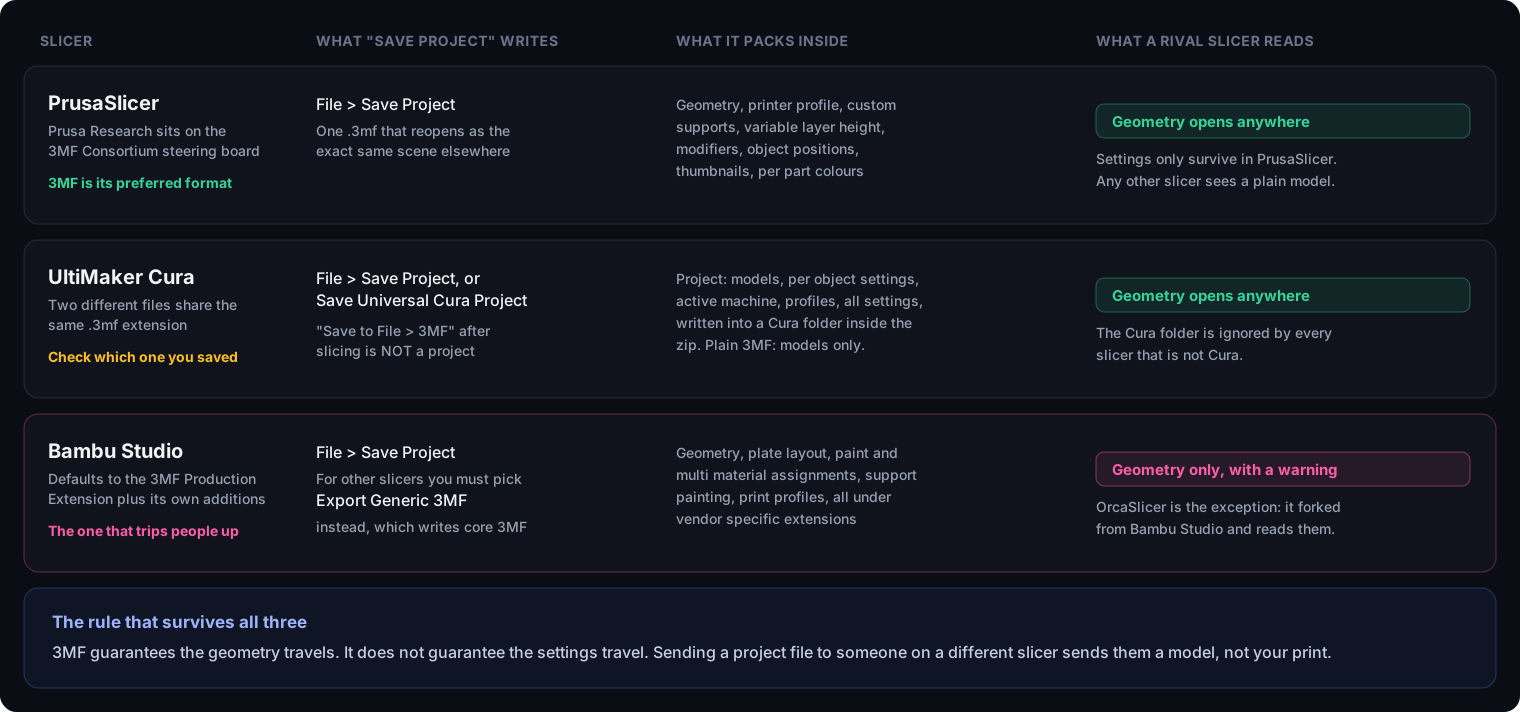
In practice the breaks are specific and documented, not theoretical:
- Bambu Studio to PrusaSlicer. PrusaSlicer reports an invalid 3MF format error naming a line in
3dmodel.model. The production extension Bambu uses references objects in a way PrusaSlicer rejects (PrusaSlicer issue 13646). Fix: use Export Generic 3MF in Bambu Studio, which writes core 3MF (Bambu Lab wiki). The trigger is narrower than it sounds: in our test of nine converters, PrusaSlicer opened a single part Bambu file without complaint and refused only a project containing a modifier or a negative part. - MakerWorld files to Cura. Some load as a completely empty build plate, with no geometry and no error that explains why (Cura issue 21143). Fix: open in Bambu Studio and re-export.
- MakerWorld files to other slicers. Configuration values such as
tree_support_wall_count: -1fall outside the range competing engines accept, and the import fails on the parameter rather than the geometry. The community response is a third-party 3MF Sanitizer that rewrites out-of-range values before your slicer sees them. - FreeCAD to PrusaSlicer. FreeCAD has exported objects tagged
type="surface", which PrusaSlicer rejects in the build section (PrusaSlicer issue 11999).
Catch two: a downloaded 3MF rewrites your calibration
This is the complaint that comes up most often in community discussion, and it is the strongest argument the STL holdouts have.
Because a project 3MF carries the designer’s complete setup, opening one can replace your printer model, nozzle diameter, filament profile and speed parameters with theirs. If you have spent hours tuning flow and pressure advance for specific spools, a downloaded file can wipe that in one click and produce a failed print from settings you never chose. Bambu Lab forum threads on preventing 3MF files from overriding settings run for pages, and the frustration is consistent: the objection is not to the layer heights but to the file quietly changing the machine configuration (Bambu Lab forum).
There is a workaround, and everyone who prints downloaded models should know it: import the file as geometry only rather than opening it as a project. The trade-off is real, though. Loading geometry only throws away the supports, orientation and profile that were the reason the designer shared a 3MF in the first place.
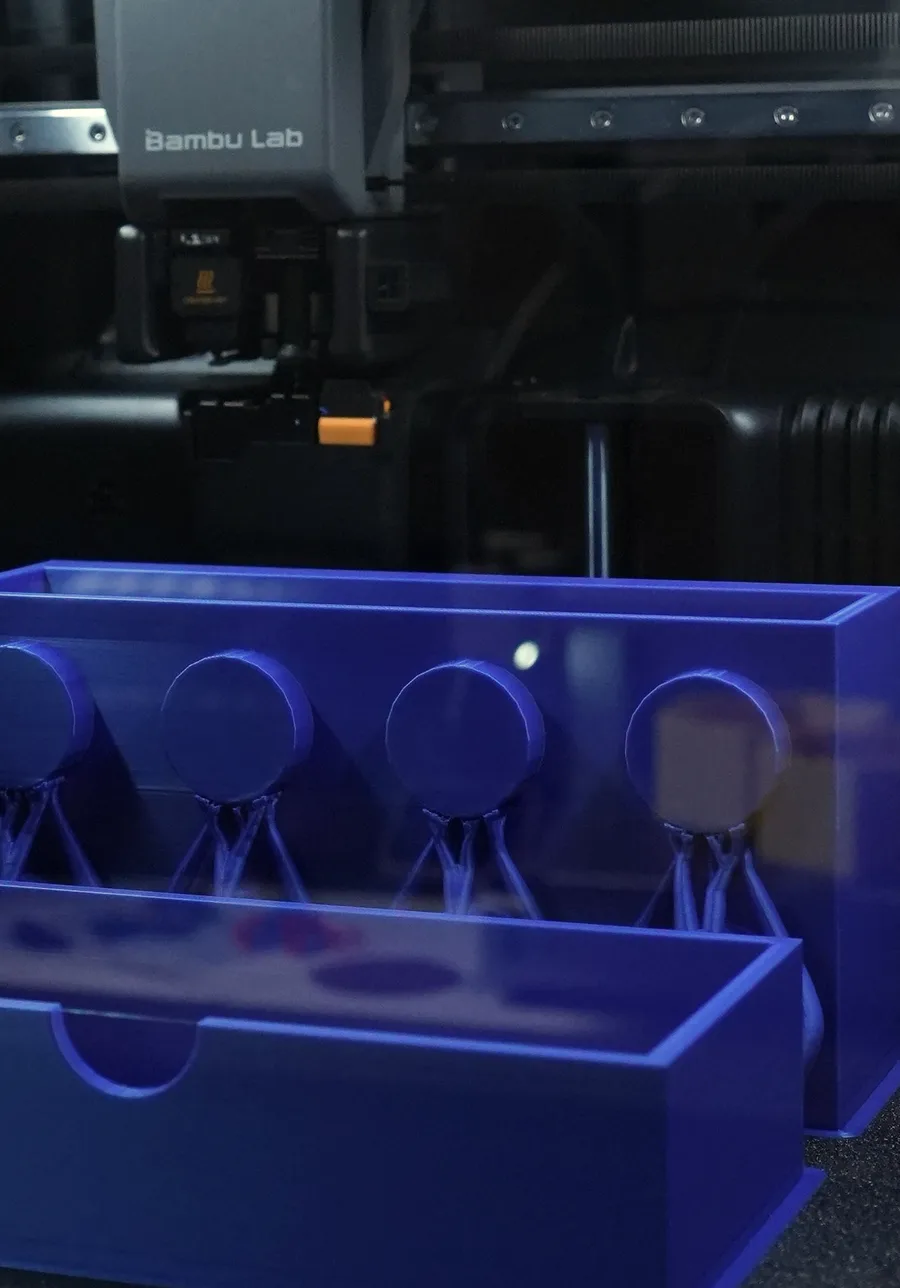
That is easier to underestimate than it sounds, so it is worth looking at what it covers. Two parts of one assembly, laid out together on the plate, and every circular tab carried by a support column that exists only because of the way the part is standing. Layout, orientation and supports are decisions about the print rather than facts about the model, and an STL has nowhere to record any of them. Import as geometry only and they are yours to work out again.
Catch three: 3MF has a real security history
This one rarely appears in format comparisons at all, and it follows directly from the design. A 3MF is a zip archive of XML that your slicer parses, trusts and acts on. That is a familiar attack surface, and researchers and attackers have both found it.
| Disclosed | Software | What went wrong |
|---|---|---|
| Sept 2024 | UltiMaker Cura 5.7.0 to 5.7.2 | The 3MF reader passed a property value into Python’s eval() unsanitised, allowing code execution from opening a file. CVSS 7.8 (NVD) |
| May 2026 | PrusaSlicer through 2.6.1 | Post-processing scripts embedded in a project file were executed during G-code export. CVSS 5.3 (NVD) |
| 2026 | OrcaSlicer before v2.3.2 | A path traversal flaw let a crafted 3MF write files outside the intended directory (release notes) |
The systematic picture came earlier. At RAID 2023, researchers from Paderborn University and Ruhr University Bochum published the first comprehensive security analysis of a 3D printing data format, built 352 test cases from the 3MF specification, and ran them against 20 applications. Sixteen of the twenty were vulnerable to at least one attack, across three classes: data exfiltration, denial of service and interface spoofing, where malicious geometry is hidden from the user’s view of the build volume (Rossel, Mladenov and Somorovsky, RAID 2023).
Which slicers read and write 3MF?
All three mainstream slicers import 3MF, but only two write it back as a model file, which matters if you use your slicer as a conversion step.
| Slicer | Imports 3MF | Exports 3MF | Project format |
|---|---|---|---|
| PrusaSlicer | Yes | Project only | 3MF, default since 2.0.0 |
| UltiMaker Cura | Yes | Yes | 3MF, project and plain differ |
| Bambu Studio | Yes | Yes, generic or Bambu | 3MF with vendor extensions |
PrusaSlicer also imports STEP and triangulates it on the way in, which makes it a practical route from CAD to a printable file without a separate conversion tool. You can check any of this against the wider directory on our format compatibility table, generated from the same tool data.
Why resin printing skipped 3MF
If you print resin, most of this article does not apply to you, and that is worth saying plainly because no comparison mentions it.
3MF is an FDM format in everything but name. Lychee Slicer added 3MF support in version 7.1, but built it for Bambu Lab FDM printers rather than for SLA, and its resin batch export remains limited to LYS, STL and OBJ. Chitubox imports 3MF while saving and slicing to its own container formats. The reason is architectural: 3MF’s metadata describes extrusion, prime towers and infill, while resin printing is a masked-image process that needs per-layer bitmaps and fine support matrices. Resin workflows use STL for geometry and a proprietary sliced format for the print, and 3MF has no useful role in between.
The case the dissenters make
A vocal group refuses to move, and their argument deserves stating properly rather than dismissing.
Their position is that 3MF is a delivery format, not a source format. It records one person’s decisions for one machine, so a 3MF is excellent for reproducing that exact print and useless for changing the design. CAD tools do not understand slicer specific 3MF metadata, so a remixer gains nothing from it. If the goal is for other people to modify your work, the format that carries the actual design is STEP, which stores mathematical surfaces rather than a triangle approximation and can be edited and rescaled without quality loss.
The strong version of the argument is that a file format allowing this much incompatibility undermines the point of a standard, and that STL’s crudeness is exactly what makes it universal. Given the compatibility failures documented above, this is not an unreasonable read. The practical conclusion most people land on is to publish more than one format rather than pick a winner.
Why AI generated models still arrive as STL
Here is a gap that will not close soon, and I see it from the inside: I work in the image-to-3d generation industry (our About page explains that background and the disclosure that comes with it). Ask any AI 3D generator for a mesh and you will be offered STL, OBJ and GLB. You will almost never be offered 3MF, and the reasons are structural rather than lazy.
There is no real unit to declare. Generative 3D systems work in a normalised space: the object is fitted into a unit cube and the mesh comes out with no physical dimension attached. 3MF’s headline advantage is a declared unit of scale, and a generator has nothing honest to put in that field. STL’s unitlessness is, for once, an accurate description of what the generator knows.
The output is not watertight by construction. These systems extract a mesh from an implicit field with marching cubes, which routinely produces isolated shells, dense uneven triangulation and non-manifold pinch points. Writing a format whose specification requires closed geometry would mean repairing first, and repair is a decision the user should make, not a silent step inside an export button.
The downstream target is usually not a printer. GLB carries PBR materials and is what game engines, AR viewers and web tools expect, so it gets the engineering attention. 3MF is a manufacturing format, and manufacturing is the smaller half of that audience today.
The practical upshot: the 3MF in your workflow gets created by your slicer, not by the generator. Import the STL, repair it, orient it, set your profile, then save the project as 3MF. That file is worth keeping, because it holds the work you did to make an unruly mesh printable.
So when should you actually switch?
Switch to 3MF for anything you will open again. Multi part assemblies, multi material prints, models where orientation and supports took real effort, and any file you want to reopen in six months and print without rediscovering your settings. The gain is not abstract: it is not redoing work.
Keep STL when compatibility is the priority. A single simple part going to a print service, a file for someone whose software you do not know, anything resin. STL asks nothing of the recipient, which is still worth something.
Add STEP when you want the design to be modified, not just printed. STEP against STL covers what that buys you and why the conversion only runs cleanly in one direction.
One consequence of the unit field is worth spelling out, because it is the single most common import failure in this whole area. 3MF is the only one of the common mesh formats that writes a unit of length into the file at all: we opened five of them as raw bytes to check, and STL, OBJ, PLY and GLB all store a bare number that the importing program has to interpret. That is why a model arrives a thousand times too small or too large, and why a 3MF simply does not.
When sharing publicly, post more than one. The STL guarantees the file opens. The 3MF carries what you learned getting it to print. The STEP lets someone build on it.
Frequently asked questions
Is 3MF better than STL?
On technical capability, yes. 3MF declares its unit of scale, stores colour and materials, keeps separate objects separate, references repeated parts instead of duplicating them, and requires closed geometry by specification. STL stores a flat list of triangles and nothing else. But 3MF is also a project file, which means it can overwrite your slicer settings, it breaks between vendors more often than the standard implies, and it has an active security history. Better at carrying data does not automatically mean better for every job.
Why does a downloaded 3MF change my printer and filament settings?
Because a 3MF saved from a slicer is a whole project, not a model. It carries the designer's printer model, nozzle, filament profile and speeds, and opening it applies them. This is the single most common complaint about the format, and it is worst for anyone who has calibrated flow and pressure advance for specific spools. Load the file as geometry only when you want the model without the designer's setup.
Why does my Bambu Studio 3MF fail to open in PrusaSlicer?
Bambu Studio writes project files using the 3MF production extension plus vendor specific additions. PrusaSlicer rejects some of that structure outright and reports an invalid 3MF format error naming a line in 3dmodel.model. Use File then Export Generic 3MF in Bambu Studio when the file is going to someone on another slicer. OrcaSlicer is the exception that reads Bambu project files, because it forked from Bambu Studio.
Are 3MF files a security risk?
They have a documented history of being one, because a 3MF is a zip archive of XML that slicers parse and act on. UltiMaker Cura 5.7.0 to 5.7.2 passed a 3MF property into a Python eval call, scoring 7.8 on CVSS. PrusaSlicer through 2.6.1 executed post-processing scripts embedded in a project file. OrcaSlicer patched a path traversal flaw in v2.3.2. All are fixed in current versions, so the practical advice is to keep your slicer updated and treat project files from strangers with the same caution as any downloaded file.
Does 3MF make files smaller than STL?
Usually yes, for two reasons. The container is zip compressed, and repeated parts are stored once and referenced with a transform rather than duplicated. Ten copies of the same bolt cost roughly one bolt in 3MF and ten bolts in STL. A single unique object sees a smaller gain, from compression alone.
Can I use 3MF for resin printing?
In practice, no. Resin slicers import 3MF but do not build workflows around it. Lychee Slicer added 3MF support in version 7.1 specifically for Bambu Lab FDM printers rather than for SLA, and its resin batch export is limited to LYS, STL and OBJ. Chitubox imports 3MF but saves and slices to its own formats. 3MF is an FDM format in everything but name.
Should I upload 3MF or STL to a model sharing site?
Upload both when the site allows it. STL guarantees anyone can open the file in any tool. A 3MF alongside it carries your orientation, per part colours and the print profile you know works. If you want people to be able to modify the design rather than just print it, add a STEP file too, since neither STL nor 3MF preserves the parametric model.
Does converting an STL to 3MF fix a broken mesh?
No. Conversion re-encodes the same triangles, so holes and non-manifold edges travel with them. The 3MF specification requires closed geometry, but that requirement binds whoever writes the file, not the converter that copies your defects into a new container. Repair the mesh first, then save as 3MF.