MakerWorld
Bambu Lab's free 3D print model library, where most downloads arrive as ready-to-print Bambu Studio 3MF projects rather than bare STL files.
Overview
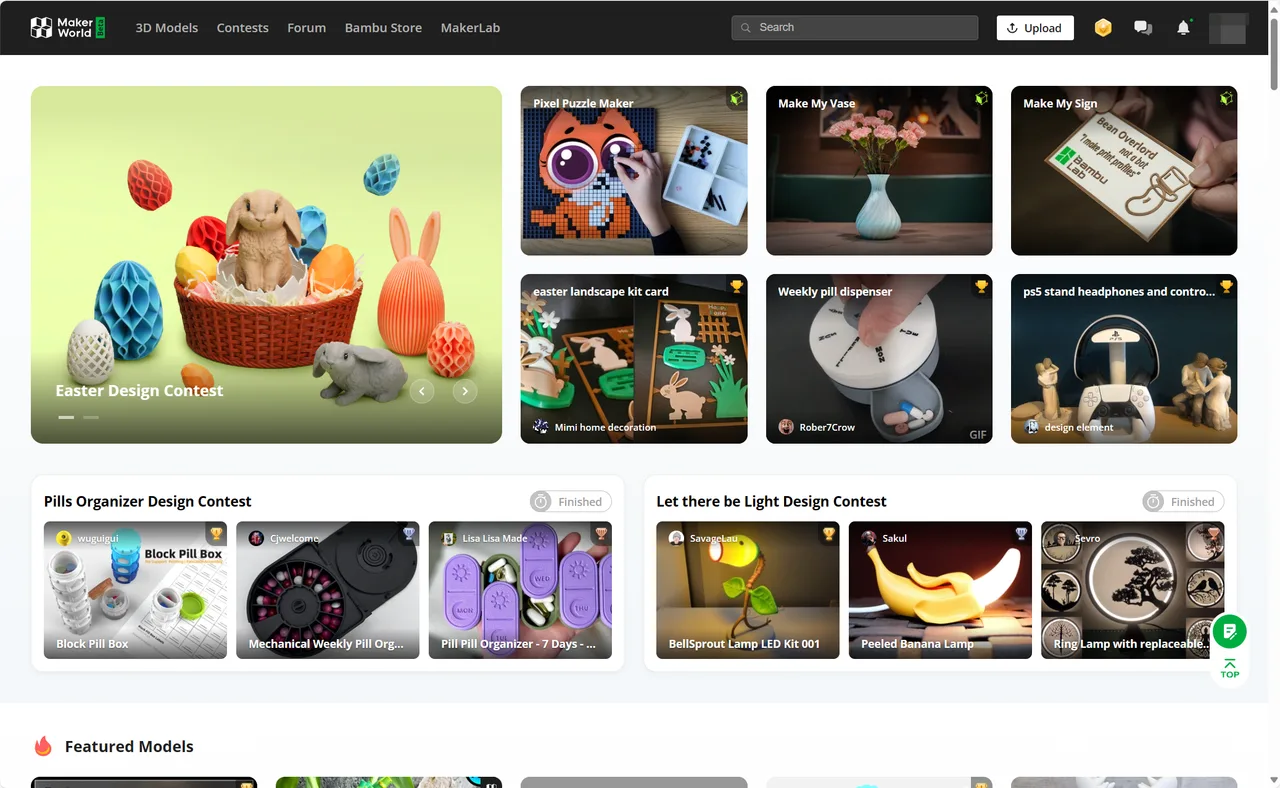
MakerWorld is the 3D print model library Bambu Lab runs alongside its printers. It was announced in August 2023 and opened as a beta that autumn. What sets it apart from Printables or Thingiverse is the unit it distributes: most models come with one or more print profiles, which are Bambu Studio 3MF projects carrying the designer's orientation, supports, colour painting and slicer settings. A profile can be opened in Bambu Studio or sent straight to a Bambu printer from the browser or the Bambu Handy phone app, with the slicing done in Bambu's cloud. Raw files such as STL, STEP or Fusion 360 archives can be downloaded too, so the library is usable from any slicer, but the one-tap path only exists for Bambu hardware. Around the library sit MakerLab, a set of browser generators that includes several third-party AI image-to-3D engines, a parts store for the non-printed components a build needs, and a points system that pays creators in Bambu store credit and, for exclusive models, cash. Browsing and downloading are free.
Key features
Print profiles instead of bare meshes
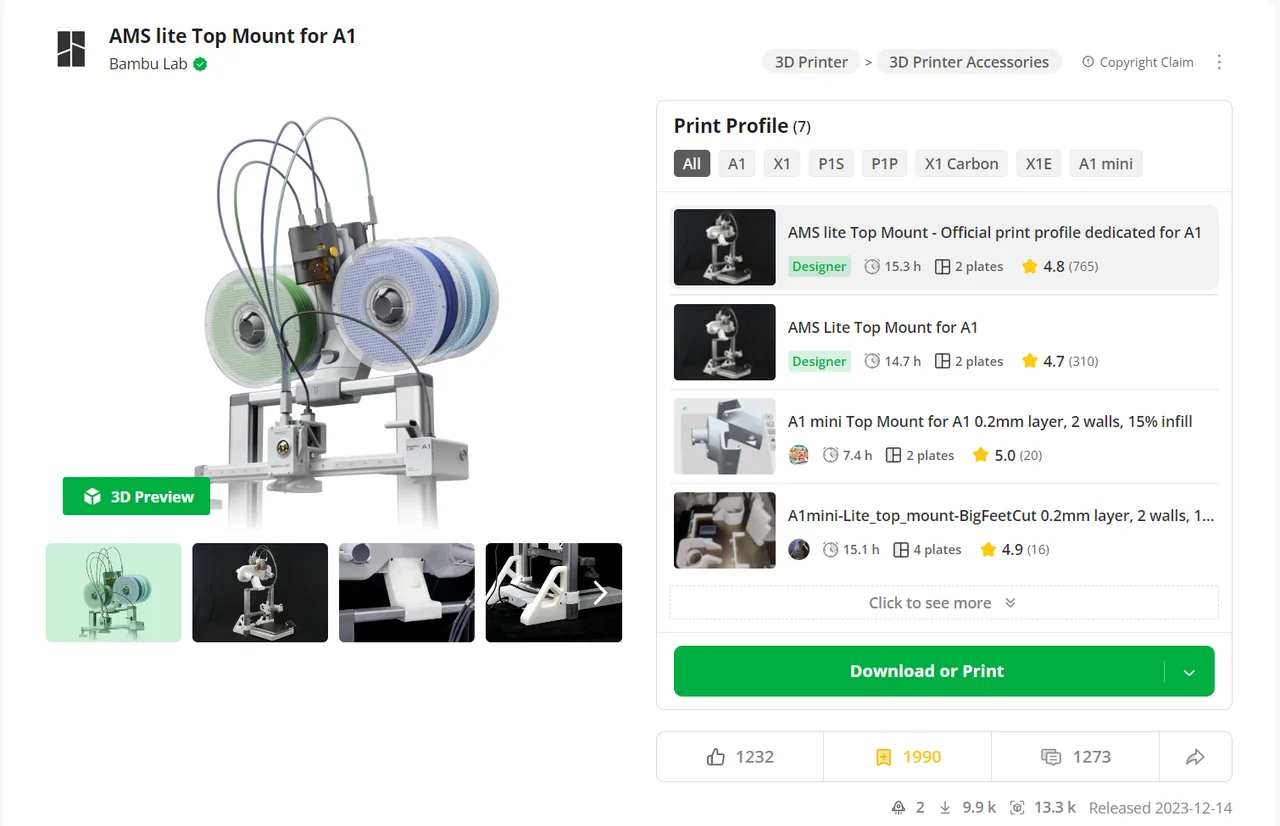
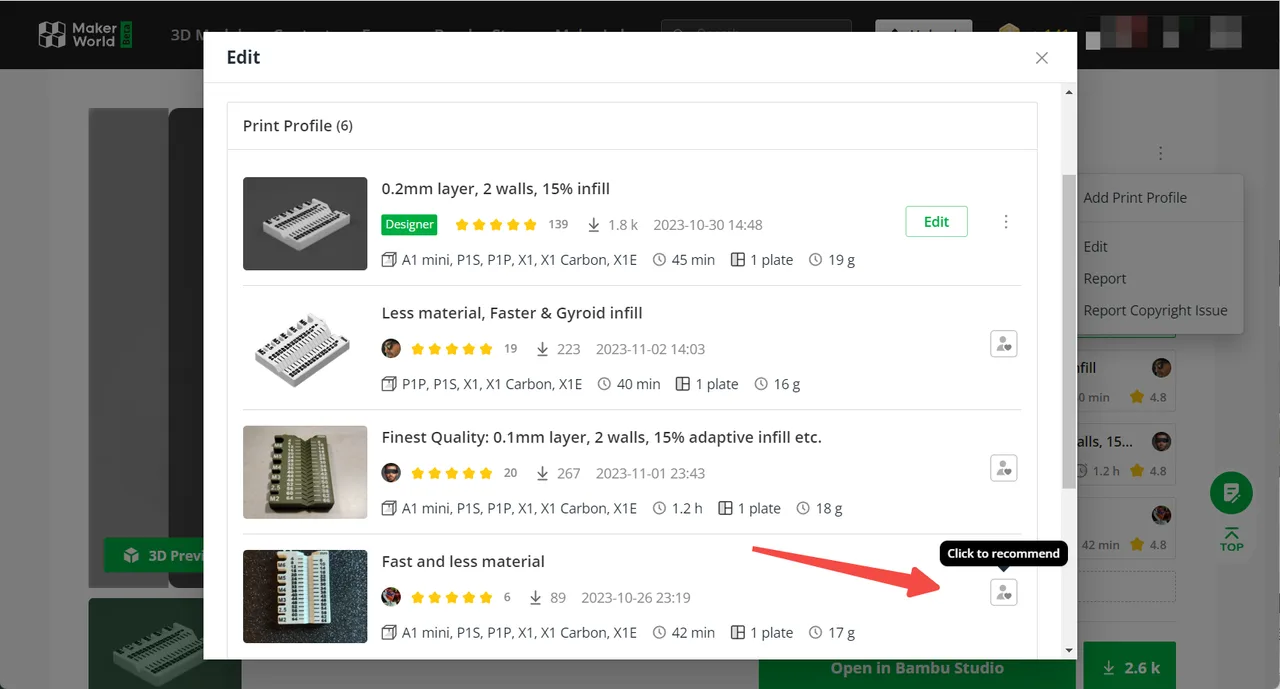
A model page holds the designer's own profiles first, then profiles other users have tuned for different printers, nozzles or filaments, sorted by rating. Each profile is a Bambu Studio 3MF with plate layout, orientation, supports, modifiers and colour assignments. Bambu's documentation requires at least one photo of a real print with every profile, and each upload passes a cloud slicing check that decides which printer models it is offered for.
One tap from page to printer
With a Bambu printer bound to the account, a profile can be sent to the machine from the website or the Bambu Handy app without opening a slicer. The app lets the user swap in the filament that is actually loaded, set the number of copies and print a single plate of a multi-plate model, and Bambu's cloud re-slices to match. This path does not exist for other brands of printer.
Raw files alongside the profiles
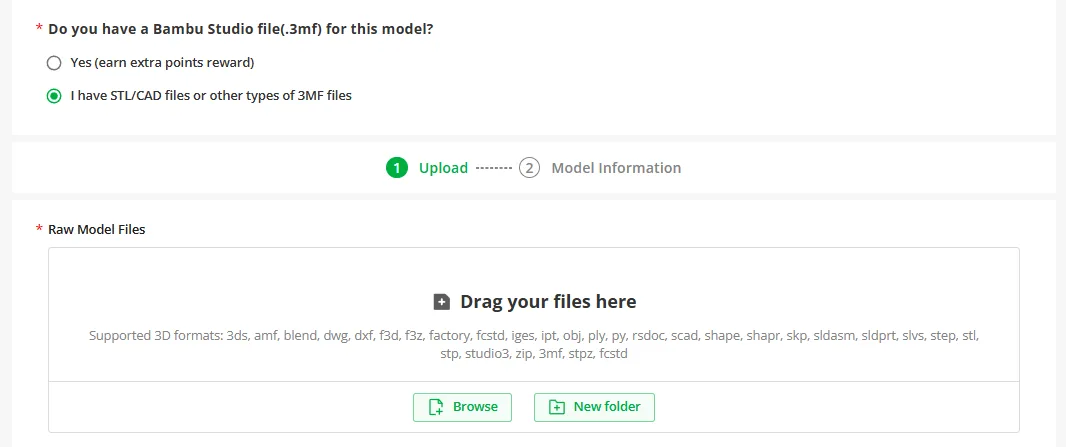
Designers can attach source files next to their profiles, and Bambu's upload guide lists close to thirty accepted types, including STEP, IGES, Fusion 360 archives, SolidWorks parts, SketchUp, FreeCAD and OpenSCAD files. These go through no printability check of their own. For anyone not printing on Bambu hardware, this download is the one that matters.
MakerLab generators
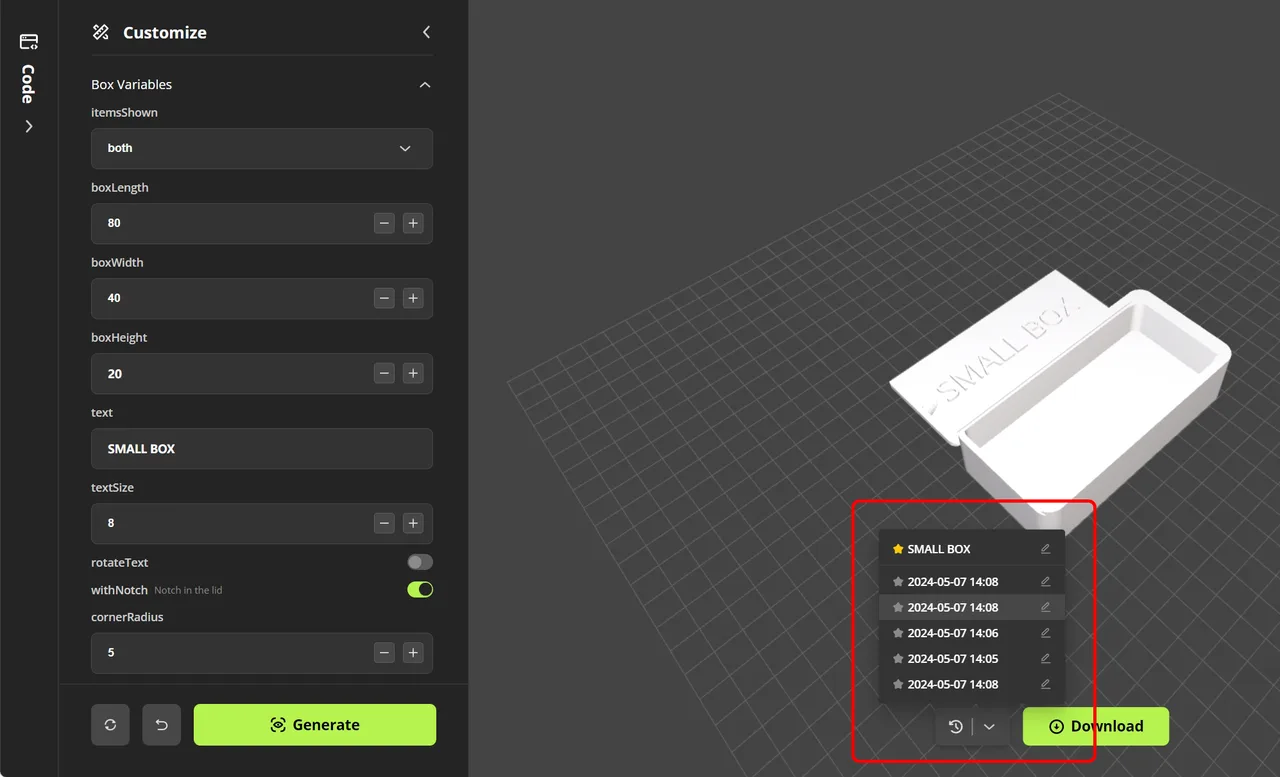
A set of browser tools that produce printable files without CAD: an OpenSCAD-based Parametric Model Maker with sliders, sign, lithophane, vase and relief generators, and an Image to 3D tool that runs third-party engines including Tripo, Rodin, Hunyuan3D, Meshy and Hi3D. Bambu reported that by the end of 2025, 310,000 people had used MakerLab and generated 2.6 million models.
Bill of materials and parts kits
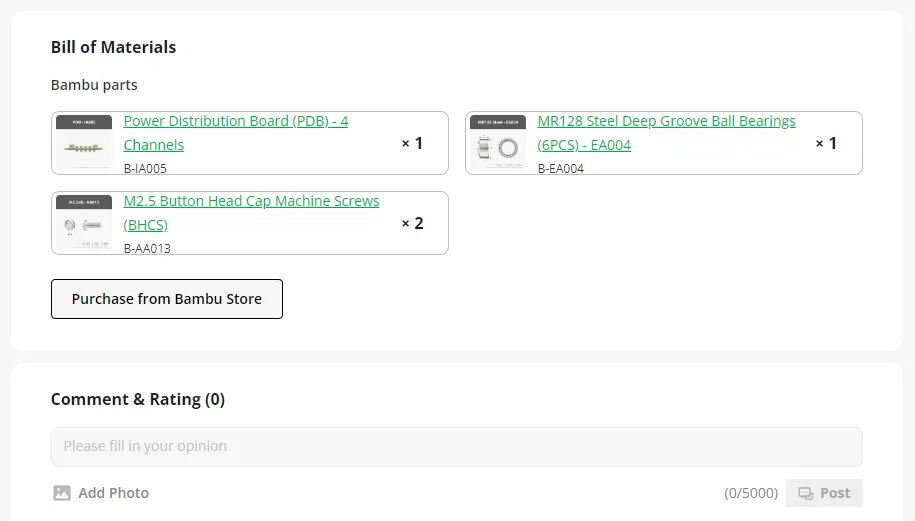
Designers can list the screws, bearings, magnets and electronics a build needs using Bambu store part numbers, and buyers can order them from the model page. Creators who qualify earn a cash commission on those sales, which Bambu's wiki puts at 3% to 15% for parts and kits and 5% or more for filament.
Creator rewards and paid licences
Designers earn points from engagement with their models and from Boosts other users give them. Points convert to Bambu store gift cards, and points from exclusive models can also be cashed out. Separately, qualifying creators can sell monthly commercial licence memberships that let subscribers sell physical prints, and creators can run crowdfunding campaigns for larger projects.
Pros and cons
What users consistently praise
- Print profiles from the designer and the community remove most of the setup work for Bambu printer owners, and a print can be started from a phone
- Each print profile must show a photo of a real print and passes a cloud slicing check that limits it to the printers it fits
- Source CAD files such as STEP, Fusion 360 and OpenSCAD are often available next to the meshes, which helps anyone who needs to modify a part
- Several ways for designers to earn from free models: store gift cards, cash for exclusive models, parts commissions and paid licence memberships
- MakerLab offers free parametric generators and several AI image-to-3D engines behind one login
What users consistently criticise
- Opening a profile 3MF on an empty Bambu Studio plate replaces the user's printer, filament and process settings with the designer's, and there is no setting to make geometry-only import the default
- Raw files uploaded without a print profile get no printability check, and forum users report that Parametric Model Maker exports often show as non-manifold in Bambu Studio until they are repaired
- Restrictive default licensing: many models are personal use only with no remixes, and an August 2026 forum analysis argues the standard licence never explicitly grants permission to print
- Creator earnings are unpredictable since the points formula was hidden in June 2025, and points can be revoked when a model is removed
- Most of the convenience is tied to Bambu Lab printers and accounts
Recurring themes across third-party user reviews (G2, Capterra, TrustRadius).
Videos


Pricing
Is MakerWorld free?
MakerWorld is free to start. There is a free tier you can use indefinitely, and paid plans above it unlock further capability.
| Plan | Price | What you get |
|---|---|---|
| Browse, download and print | Free | Models, print profiles, raw files and one-tap printing to a Bambu printer cost nothing. A free Bambu Lab account is needed for downloads and printing. |
| MakerLab parametric and template generators | Free | MakerWorld's own generators, such as the Parametric Model Maker and the sign and lithophane makers, stayed free when billing changed in June 2026. |
| MakerLab AI generation | Credits per generation | Since 25 June 2026 credits are spent when a model is generated, not when it is exported, so a retry costs again. Each account gets two free AI generations in total. The official guide lists 28 credits for Hunyuan 3D 3.1 and 45 each for Meshy 6 and Rodin Gen-2, and 80 MakerWorld points buy 600 credits. Credits can also be bought with money. |
| Commercial licence membership | USD 3 to 300/month, set by each creator | Bought from an individual creator to sell physical prints of that creator's models. Paid through PayPal only. MakerWorld keeps 10% plus payment provider fees, as of the February 2025 launch. |
| Crowdfunding pledges | Set per campaign | Backers pay a campaign's chosen tier to receive its files, and some tiers include a commercial licence. |
Best for
Bambu Lab printer owners
Profiles are tuned for the exact machines, and a print can start from a phone without touching a slicer.
First-time printers
Choosing a profile that matches the printer and has good ratings replaces the orientation, support and settings decisions that usually cause early failures, and the photo requirement shows what a successful print looks like.
Designers who want their work to pay
Points become store credit or cash, and paid licence memberships and crowdfunding give creators recurring income without leaving the platform.
People trying AI image-to-3D for printing
MakerLab puts several commercial generators behind one account and sends the result straight into the same print flow, so several engines can be tried on the same image without installing anything.
Who should look elsewhere
Owners of other printer brands
The library is usable, but the tuned profiles and one-tap printing are not. Expect to download the raw STL or STEP and set everything up yourself, or to import the 3MF as geometry only and lose the designer's settings and colour layout.
Remixers and open-source purists
Many models use MakerWorld's Standard Digital File License, which allows personal use only and forbids remixes and sharing the files elsewhere. A newer MakerWorld Exclusive License permits remixes only if they stay on MakerWorld. Printables or Thingiverse suit a Creative Commons workflow better.
Creators who post fan art or rely on stable income
The points formula has been hidden since June 2025, and points tied to a model can be revoked if it is taken down for copyright or found to break program rules. Trustpilot reviewers mostly complain about removals and unanswered appeals.
Frequently asked questions
Is MakerWorld free?
Yes for browsing, downloading and printing, with a free Bambu Lab account. Money only comes in at three optional points: MakerLab AI generations, which cost credits per generation after two free ones; commercial licence memberships, which a buyer pays to an individual creator (USD 3 to 300 a month) in order to sell prints; and crowdfunding pledges.
Why does opening a MakerWorld 3MF change my printer and filament settings?
Because a print profile is a whole Bambu Studio project, not just a model. Opened on an empty plate, it loads the designer's printer, plate, filament slots and process settings over your own. To keep your settings, put any object on the plate first and then open or drag in the 3MF: Bambu Studio will then ask whether to open it as a project or import geometry only. Geometry only keeps your presets but drops the designer's plate layout and colour assignments. Alternatively download the raw STL or STEP instead of the profile.
Can I use MakerWorld models with a non-Bambu printer?
Yes. Download the raw STL or CAD files from the model page and slice them as you would any other model, or import the profile 3MF into another slicer, which reads only its geometry (OrcaSlicer says so in a message when it loads one). What you lose is the designer's tested settings and the one-tap printing, which only work with Bambu Lab printers.
Do models downloaded from MakerWorld need repair before printing?
Print profiles have been through a cloud slicing check and come with a real print photo, so they usually slice as delivered on the printers they list. Raw files have no such check. Forum users report that models exported from MakerWorld's own Parametric Model Maker often show as non-manifold in Bambu Studio, which blocks some operations until the built-in repair is run. Checking a downloaded file before you paint or slice it is worth the minute it takes.
Can I sell prints of models I download from MakerWorld?
Only if the licence allows it. Models under CC0 or CC BY can be sold with the required credit. Models under MakerWorld's Standard Digital File License, the MakerWorld Exclusive License or any non-commercial Creative Commons licence cannot, unless you buy that designer's commercial licence membership or a commercial tier in their crowdfunding campaign.
Which AI generators does MakerLab Image to 3D use?
Several third-party engines, chosen per generation: the options have included Tripo, Rodin, Hunyuan3D, Meshy and Hi3D, at different credit prices. Before March 2026 the tool ran on Tripo alone with a monthly usage cap. Since June 2026 each generation costs credits whether or not the result is exported, and every account gets two free generations in total. The result can go straight into the print flow, so it is worth checking the mesh before committing filament.
How do creators earn on MakerWorld?
Through points earned from engagement and from Boosts, which turn into Bambu store gift cards; community reports put a USD 40 card at about 490 points. Points from the Exclusive Model Program, which needs 100 total prints across a creator's models and keeps a model MakerWorld-only for at least 90 days, can also be cashed out at USD 0.066 per point once the balance reaches USD 100. On top of that come parts commissions, paid licence memberships and crowdfunding. The exact points formula is not published.
Latest official news
- Bambu Lab launches the R1 laser cutter and engraver, its first machine beyond 3D printing
- MakerWorld opens an accessibility design challenge with seven organisations
- MakerLab credits switch to charging per generation instead of per export
- MakerWorld launches the Creator Copyright Protection Program
- MakerWorld introduces crowdfunding for creator projects
- Commercial licence memberships let creators sell print rights
Do you make MakerWorld? Add a badge to your site

Link to this page with the badge below (use listed-light.svg on a light background). Spotted something out of date? Tell us.
<a href="https://3dtoolwiki.com/tools/makerworld" target="_blank"><img src="https://3dtoolwiki.com/badges/listed-dark.svg" alt="Listed on 3D Tool Wiki" width="200" height="54"></a>