GLB to FBX: What Survives the Conversion, Measured
Published 2026-11-03
A successful export tells you that an FBX was written. It does not tell you whether its images travelled with it, whether metallic and roughness still drive the material, or whether the receiving application interprets its dimensions the same way.
How to convert a GLB to FBX in Blender
- Start with an empty scene so the default camera, light and cube do not join the export. Use File, Import, glTF 2.0 and choose the
.glb. - Inspect the imported model. Record an expected dimension and check whether its image textures, rig and actions are present before conversion.
- Use File, Export, FBX. Set Path Mode to Copy, then enable the adjacent Embed Textures control. Save to a new folder. If your scene contains unrelated objects, export only the intended selection.
- Copy only the resulting FBX to a fresh folder. Reopen it in a new scene, then test it in the application that will actually consume it. Compare dimensions, materials and any animation with the original.
The tested export calls were bpy.ops.export_scene.fbx(filepath=out) for default and bpy.ops.export_scene.fbx(filepath=out, path_mode="COPY", embed_textures=True) for embedded. All other export settings stayed at the installed version’s defaults. Blender’s export API documents these controls; the exact calls above define our test.
If the destination already accepts GLB, try that route before converting. Our GLB file guide explains the container, and FBX vs OBJ covers the broader format tradeoffs. Neither a new extension nor an export checkbox reconstructs information absent from the source.
What we actually tested
We re-read 14 saved conversion files from 4 inputs with Blender 5.2.2 and Assimp 6.0.5. The full dataset contains 28 file/reader pairs, including 1 in-place read failure. The article tables show WaterBottle and Fox subsets; the downloadable data and benchmark contain every pair. Each reader also received a fresh folder containing the FBX alone. These are repeated readings of the same files, not independent conversion trials.
| Input | Why it is in the test | Completed conversion paths |
|---|---|---|
| Khronos WaterBottle | Textured material with multiple PBR maps | Blender default, Blender Copy + Embed, Assimp, convert3d.org |
| Khronos Fox | Skinning and animation | Blender default, Blender Copy + Embed, Assimp, convert3d.org |
| TRELLIS.2 mug | A retained generated model from our baseline | Blender default, Blender Copy + Embed, Assimp |
| Procedural vertex-colour sphere | Colour attributes without image textures | Blender default, Blender Copy + Embed, Assimp |
The online-service sample is deliberately incomplete. Only the two saved public-sample outputs are included. We did not upload more files, buy access or recheck service pricing for this article. This is an examination of these files, not a converter ranking or a promise about a service’s current output.
The raw output is published as JSON, produced
by scripts/measure-glb-to-fbx.py.
Did the image arrive, and does the material use it?
Those are different questions. A material can contain a reference to an image that the reader cannot load. Conversely, an image can be present while the metallic or roughness input no longer uses the texture connection found in the source GLB.
Scroll the table horizontally on smaller screens to compare all columns.
| Conversion | Reader | Images available* | Images referenced by reader | Available, FBX alone* | Source texture channels absent |
|---|---|---|---|---|---|
| Assimp | Blender | 4 | 4 | 4 | metallic, roughness |
| Assimp | Assimp | 3 | 3 | 3 | metallic-roughness, occlusion |
| Blender default | Blender | 0 | 3 | 0 | metallic, roughness |
| Blender default | Assimp | 0 | 3 | 0 | metallic-roughness, occlusion |
| Blender Copy + Embed | Blender | 3 | 3 | 3 | metallic, roughness |
| Blender Copy + Embed | Assimp | 3 | 3 | 3 | metallic-roughness, occlusion |
| convert3d.org | Blender | 5 | 5 | 5 | None in this reader’s tested set |
| convert3d.org | Assimp | 0 | 0 | 0 | base colour, metallic-roughness, normal, emission, occlusion |
*Blender: loaded image dimensions. Assimp: embedded image or resolving external path, without pixel validation. Referenced images are a separate reader-specific inventory, not the number of source images or a retention denominator.
For WaterBottle, Fox and mug, both readers found image references but zero available images in the Blender default export. Blender Copy + Embed made images available for those inputs, including when the FBX travelled alone. The vertex-colour sphere had no image textures to carry. In the Copy + Embed path, both readers still reported the tested metallic and roughness texture connections absent for WaterBottle and the generated mug.
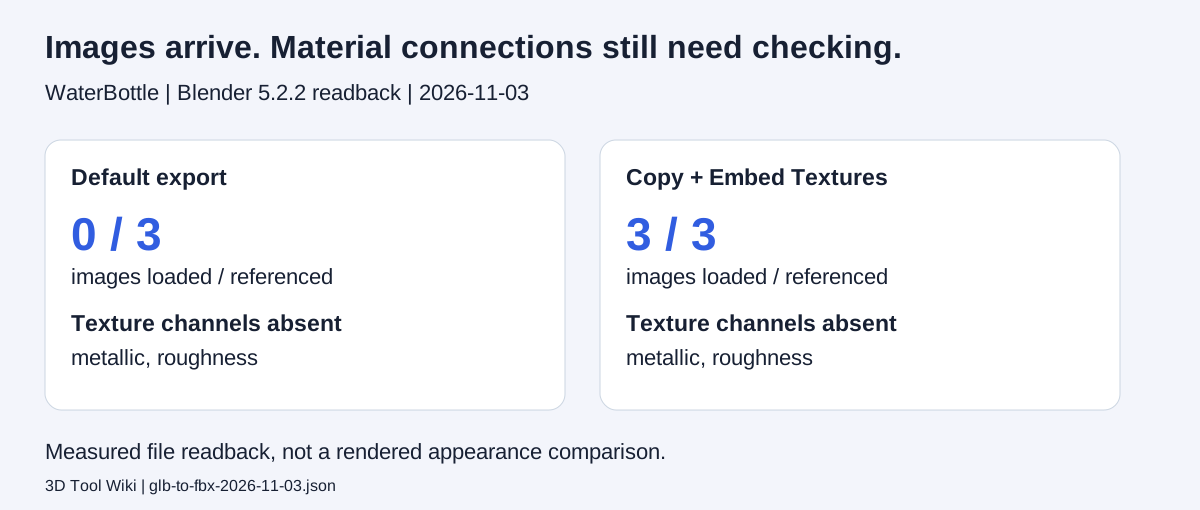
This figure is generated from the downloadable measurements. It is a data diagram, not a screenshot or a comparison of rendered appearance.
Do not read the image counts as a percentage of textures preserved. A packed source image can be split, and readers expose different image inventories. The material-channel columns are also reader-specific: Blender reports metallic and roughness separately, while our Assimp path reports a combined metallic-roughness connection and a separate occlusion connection. The Blender summary does not test ambient occlusion.
There is also a difference in the image check itself. Blender reports a loaded image with nonzero dimensions. The Assimp path reports an embedded image or an external image path that resolves; it does not independently decode and validate the image pixels. A reported channel connection can exist even when its referenced image is unavailable. Read the image and channel columns together.
For a general example of how references break when a model travels without its dependencies, see the texture-survival benchmark. For this conversion, inspect the actual material inputs instead of treating an embedded image as proof of a restored PBR material.
The same online output gave different answers
For the saved convert3d WaterBottle output, Blender reported base colour, metallic, roughness, normal and emission texture connections. The Assimp path opened that same file without any of those texture channels. A separate convert3d Fox output opened in Blender, while Assimp reported an FBX parser error.
That disagreement belongs in the result. It rules out a blanket claim that the file preserved everything or that it could not be opened. It also explains why a check in the actual destination matters: neither Blender nor our Assimp round-trip is a substitute for testing an Autodesk SDK importer or a game engine.
Size and animation need their own acceptance checks
Scroll the table horizontally on smaller screens to compare all columns.
| Conversion | Reader | Bones / source | Animations / source | Largest extent / source |
|---|---|---|---|---|
| Assimp | Blender | 24 / 24 | 3 / 3 | 0.01× |
| Assimp | Assimp | 24 / 24 | 3 / 3 | 1× |
| Blender default | Blender | 30 / 24 | 3 / 3 | 1× |
| Blender default | Assimp | 24 / 24 | 3 / 3 | 100× |
| Blender Copy + Embed | Blender | 30 / 24 | 3 / 3 | 1× |
| Blender Copy + Embed | Assimp | 24 / 24 | 3 / 3 | 100× |
| convert3d.org | Blender | 24 / 24 | 3 / 3 | 1× |
| convert3d.org | Assimp | All measurements unavailable because this reader failed: import failed: FBX-Parser (TOK_KEY, offset 0x1e1a) expected compound scope | ||
The size column is the largest bounding-box extent of the FBX divided by the same reader’s source-GLB extent. It is a reader-space ratio. For Assimp, both readings come through its pretransformed GLB export representation. The Blender-exported Fox files read as 1× source size in Blender and 100× in Assimp; this reader disagreement is not a verified physical-scale error. We did not normalize physical units or verify axis orientation, so these values are not instructions to rescale every converted model by a fixed factor. Record a known dimension and verify it in the destination before applying any correction.
The skeleton and animation columns are counts. They do not establish identical keyframes, clip duration, deformation or motion. Blender reads 30 bones against 24 in the source for its local Fox exports, while Assimp reads 24. Blender’s default export includes additional leaf bones, a plausible explanation that we did not establish by tracing individual bones. Inspect the rig rather than treating a different count as proof that an animation is unusable. Play each intended action and inspect its deformation in the receiving application.
The sphere retained a colour attribute in both readers on each tested local path. The textured inputs retained a UV set on successful reads. Those observations establish presence only: we did not compare UV coordinates or vertex-colour values element by element.
When the GLB came from an AI generator
The mug used here is an existing TRELLIS.2 output from our generated-model baseline. In the Blender Copy + Embed readback, images were present while the tested metallic and roughness texture connections were absent. That is one retained output, not a statement about every generated model.
Conversion does not fix an arbitrary source scale, loose shells or a wrong interior. Work through the AI model diagnostic sequence first. If the intended destination is Unity, use the separate Blender to Unity checks; those engine results should not be inferred from this file-readback test.
Method, attribution and limits
The readback was repeated on November 3, 2026 using retained GLB inputs and FBX outputs. The local conversion paths were generated by the accompanying script: Blender default, Blender Copy + Embed and Assimp’s FBX exporter. The two online outputs are archived downloads with no independently recorded service build version.
For each file, each reader received its own fresh temporary folder. In-place readings copied the output folder; the second condition copied only the FBX. This prevents a file unpacked by Blender from becoming an accidental input to Assimp’s subsequent read. Assimp measurements use its GLB export representation, including a pretransformed export for the bounds. They describe that reader pipeline, not an exhaustive inspection of every FBX property.
The JSON includes source and output readings, SHA-256 hashes, software versions, channel definitions through the named fields, and explicit exclusions. Image paths are reduced to filenames in the public copy; load results were calculated before that normalization. Raw mesh files are not redistributed here. The site repository is private, so it is not offered as a public evidence link.
WaterBottle is by Microsoft, CC0, distributed through Khronos glTF Sample Assets. Fox credits: PixelMannen, model, CC0; tomkranis, rigging and animation, CC BY 4.0; AsoboStudio and scurest, glTF conversion, CC BY 4.0, as recorded in the Fox attribution. Our conversions alter the packaging and may alter represented data. The sphere was created procedurally for this test; the mug’s generation conditions are documented in the baseline.
No Unity, Unreal, Godot, Maya or 3ds Max import was performed for this dataset. Rendering equivalence, physical-unit equivalence, axis orientation, keyframe fidelity, UV-coordinate fidelity and colour-value fidelity remain untested. The practical acceptance test is still the one at the start: reopen the exported asset where it will be used and compare it with the source.
Frequently asked questions
How do I convert GLB to FBX with textures in Blender?
Import the GLB into an empty Blender scene, export FBX with Path Mode set to Copy and Embed Textures enabled, then reopen the exported file from a fresh folder. In our saved-file tests, this carried image data that the default export did not load. It did not preserve every metallic and roughness texture connection, so check material channels separately.
Does converting GLB to FBX lose quality?
It can change material connections, the reader's reported scale and skeleton structure. Our test measures image loading, channel connections, dimensions and counts. It does not establish identical rendering, animation motion or physical units across applications. Validate the actual receiving application.
Why is the FBX grey even though my GLB has textures?
Check whether the image files arrived and whether the receiving material uses them. Those are separate failures. A material can reference a missing image, or an image can load without reconnecting the source metallic and roughness channels. Keep the original GLB and a copy of its textures while diagnosing the export.
Should I convert a GLB if my application already imports it?
Try the original GLB in the destination first. Convert when the workflow requires FBX or its importer works better for the asset. A different extension alone does not repair geometry or create a missing rig.