FBX vs OBJ: What Survives the Conversion and What Silently Does Not
Published 2026-08-14
Every comparison of these two formats reaches the same conclusion: FBX is the capable modern one, OBJ is the simple old one. That is true for geometry, rigs and animation. It is backwards for materials, and the reason is written into the FBX specification itself rather than being anyone’s bug.
What each format actually stores
OBJ was published by Wavefront in the 1980s as a plain text geometry format. FBX was built by Kaydara for MotionBuilder, and Autodesk has owned it since 2006 (Library of Congress). One was designed to describe a shape, the other to describe a scene at a moment in time.
| OBJ | FBX | |
|---|---|---|
| Geometry and UVs | Yes | Yes |
| Materials | Via a separate .mtl text file | Embedded, richer structure |
| PBR metallic and roughness | Yes, via MTL extensions | No field exists |
| Vertex colours | Not in the spec, non standard extension only | Yes |
| Skeleton and skin weights | No | Yes |
| Animation | No | Yes |
| Cameras and lights | No | Yes |
| Scene hierarchy | Very limited | Yes |
| Human readable | Yes, plain text | Binary in practice |
The first seven rows are the conventional answer and they are correct. The third row is the one nobody explains, and it is worth the rest of this section.
Why your PBR maps vanish through FBX
When metallic and roughness values fail to arrive in Unity or Unreal, the usual explanation is that materials are “application specific”. That is a description of the symptom. The actual cause is that the FBX container has nowhere to put them.
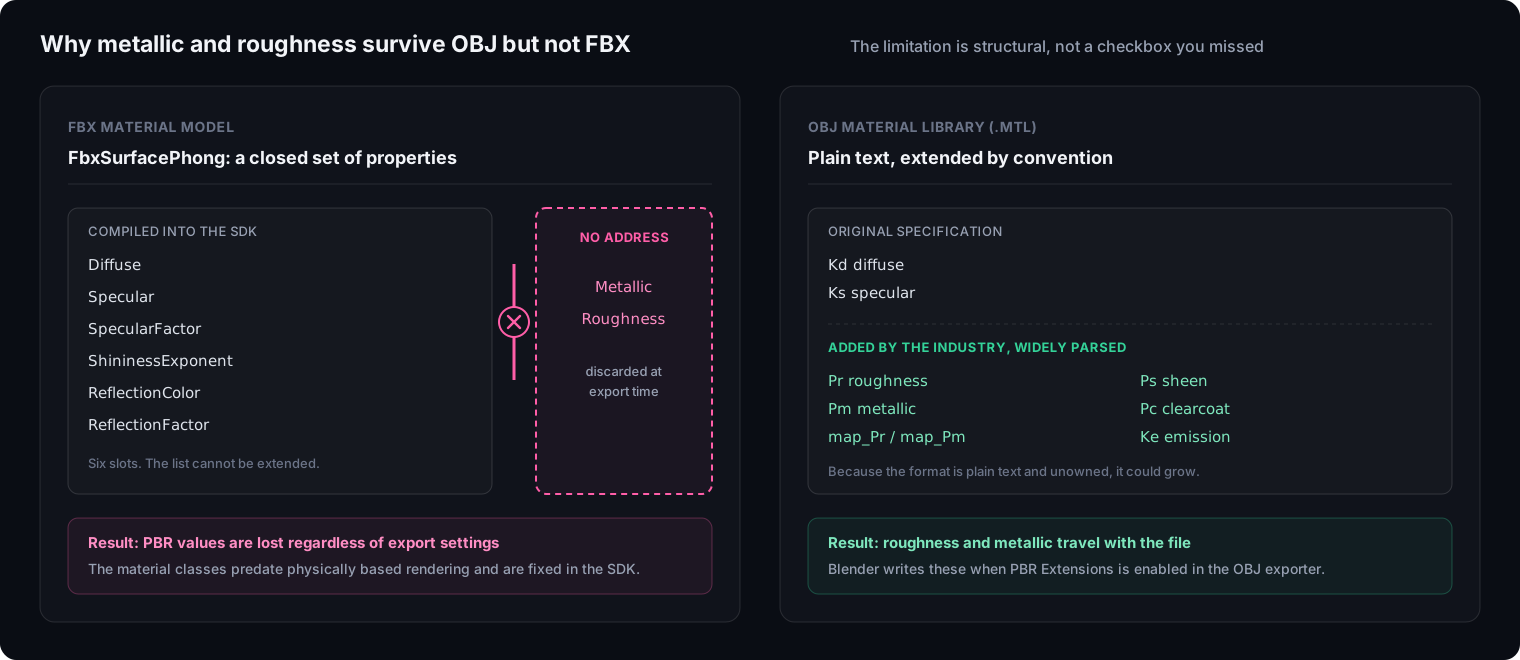
FBX materials derive from a base class, FbxSurfaceMaterial, which branches into exactly two shading models: FbxSurfaceLambert and FbxSurfacePhong. Both predate physically based rendering by roughly two decades, and the properties available inside FbxSurfacePhong are fixed:
- Diffuse
- Specular
- SpecularFactor
- ShininessExponent
- ReflectionColor
- ReflectionFactor
There is no metallic. There is no roughness. When an exporter serialises your node based material into FBX, those values have no address to be written to, so they are discarded. No export setting recovers them, because the limitation is structural rather than optional.
OBJ’s material file went the other way. The original MTL specification is equally old and equally pre PBR, but because it is plain text and unowned, the industry bolted extensions onto it that are now widely written and read:
Prroughness,map_Prroughness mapPmmetallic,map_Pmmetallic mapPssheen,Pcclearcoat thickness,Pcrclearcoat roughnessKeemission
Blender’s OBJ exporter exposes these under a PBR Extensions option in the Materials section of the export panel (Blender manual). The closed FBX format could not evolve the same way, because its material classes are compiled into the SDK.
How do I convert an FBX file to OBJ?
The reliable route is Blender, because it runs locally and lets you inspect the result before committing. Import the FBX, then export as Wavefront OBJ.
The export panel options matter more than the import, and this is where most published instructions are out of date. Blender rewrote its OBJ importer and exporter in C++ starting in version 3.2, which brought a reported 10x to 13x speed improvement over the old Python implementation, and the option names changed along with it. Current names, verified against the Blender 5.2 manual:
| Section | Option | What it does |
|---|---|---|
| General | Include: Selected Only | Export only the selection rather than the whole scene |
| Geometry Properties | UV Coordinates | Write the active UV layer |
| Geometry Properties | Normals | Write face and vertex normals |
| Geometry Properties | Colors | Write vertex colours using the non standard xyzrgb extension |
| Geometry Properties | Triangulated Mesh | Split quads into triangles for basic parsers |
| Materials | PBR Extensions | Write the Pr and Pm roughness and metallic values |
| Materials | Path Mode | How texture paths are written. Set to Copy to bring the image files with the export |
Older tutorials and most AI generated answers still name these Include UVs, Write Normals and Write Materials. Those strings belonged to the pre 3.2 Python exporter and no longer appear in the interface.
Automating this in a script has a matching trap. The old operator bpy.ops.export_scene.obj() no longer exists in current Blender. OBJ export moved to the window manager namespace as bpy.ops.wm.obj_export(), while FBX stayed put as bpy.ops.export_scene.fbx() (Blender Python API).
Why the two directions are not symmetric
Converting FBX to OBJ discards the skeleton, the animation, the cameras and the hierarchy. That is expected, and reversible only in the sense that you still have the original file.
Converting OBJ to FBX loses nothing, and gains nothing. The OBJ never held a rig, so the resulting FBX does not contain one either. It is a container change, useful only when a pipeline insists on the extension.
The asymmetry that does surprise people is vertex colours. The official OBJ specification defines a vertex as three coordinates and nothing else. Applications such as MeshLab extend the syntax by appending colour to the vertex line as v x y z r g b, which is not part of the format and which many importers discard as unexpected trailing values. If you are moving a polypainted sculpt or a coloured scan, PLY or FBX will carry it and standard OBJ will not.
The 100x scale problem
An asset arrives in Unity at a scale of 100 instead of 1, physics behaves strangely, and the usual fix offered online is to scale the root object back down. That fix hides the problem rather than solving it.
Blender’s own documentation states the cause plainly: it uses FBX scale to detect units on import, but many other applications do not handle it the same way (Blender Python API). The relevant control is Apply Scalings in the FBX exporter, and it has four values:
| UI name | Behaviour |
|---|---|
All Local (default) | Custom and unit scaling are baked into each object transform, FBX scale stays at 1.0 |
FBX Units Scale | Custom scaling goes into object transforms, unit scaling goes into FBX scale |
FBX Custom Scale | The reverse of the above |
FBX All | Both go into FBX scale |
The default is the one that causes trouble, which is why so many people meet this problem without changing any settings. Switching to FBX Units Scale writes the unit conversion into the file header where the receiving application can read it, instead of pre multiplying every transform.
Version compatibility, briefly
FBX versions are named by year and tied to the SDK that wrote them. Three practical points cover most cases:
- Blender writes FBX 7.4 binary and offers no version dropdown. It corresponds to the 2014 era SDK and is read without complaint by current Unity and Unreal.
- Unreal reads FBX 2020.2 natively, and Epic recommends targeting that version or older.
- Blender cannot read ASCII FBX at all. It fails with
ASCII FBX files are not supportedbecause only a binary parser is implemented. Maya and 3ds Max can write either, so a file destined for Blender must be exported as binary.
What actually changed in 2025 and 2026
Two shifts are recent enough that most published guidance, including most AI answers, has not caught up.
Blender split FBX handling in two. In current versions the FBX importer is a native implementation described in the manual as fast, memory efficient and compatible with both modern and legacy files, with its own documented options for geometry, materials, animation and armatures. FBX export, however, is still provided by an add-on. The manual’s FBX page now documents the importer in full and covers export with a single line pointing at the add-on (Blender manual).
Unreal’s Interchange framework is not the FBX default that everyone says it is. Interchange was introduced in 5.4 and widely reported as having replaced the legacy FBX importer in 5.5, and there were real problems during that period, including morph targets splitting into separate animation sequences. But Epic’s current documentation describes FBX support in Interchange as Experimental, and the console variable Interchange.FeatureFlags.Import.FBX is documented as toggling experimental FBX import rather than disabling a default (Unreal Engine documentation).
The short version
Rigged or animated: FBX, no alternative. OBJ has no representation for a skeleton, so nothing you do at export time can carry one.
Static prop where materials matter: consider OBJ. Its MTL extensions carry roughness and metallic values that FBX structurally cannot, provided the receiving software reads extended MTL.
Either way, verify the material on arrival. The most expensive failures in this workflow are silent: the mesh looks correct, so nobody checks the material until much later.
Two settings prevent most of the damage. Set Path Mode to Copy when exporting OBJ so textures travel with the file, and change Apply Scalings away from its All Local default when exporting FBX for a game engine.
If the destination is a 3D printer rather than an engine, neither of these is the right format: what OBJ stores that STL cannot covers that side of the choice. For delivery to a browser, where a single file has to carry geometry and textures together, GLB is the format that solves the path problem described above by embedding the textures outright.
Frequently asked questions
What is the difference between FBX and OBJ?
OBJ stores a static mesh: vertices, faces, normals, UV coordinates, and a link to a plain text material file. FBX stores an entire scene: the same geometry plus skeletons, skin weights, animation curves, cameras, lights and the object hierarchy. If your asset moves or has parts that must stay separate, you need FBX. If it is a static prop, OBJ is smaller in scope and easier to debug because you can open it in a text editor.
Which should I use for Unity or Unreal?
FBX for anything rigged or animated, since neither engine can reconstruct a skeleton that the file never carried. For a static prop either works. Unreal reads FBX 2020.2 natively. One caveat that applies to both: neither format reliably carries metallic and roughness values, so expect to relink PBR maps in the engine regardless of which you pick.
Why did my textures disappear after exporting FBX?
Two separate causes get confused. The first is file paths: Blender's FBX exporter has embed_textures set to False by default, so the FBX references image files that stay on your machine rather than travelling with it. The second is deeper and cannot be fixed by a checkbox: the FBX material model has no field for metallic or roughness at all, so those values are discarded during export no matter what you tick.
Does OBJ support PBR materials?
Better than most people assume. The original MTL specification predates PBR, but an unofficial extension is now widely written and parsed: Pr for roughness, Pm for metallic, map_Pr and map_Pm for the corresponding texture maps, plus Ps for sheen, Pc for clearcoat and Ke for emission. Blender's OBJ exporter has a PBR Extensions option that writes them. FBX has no equivalent, which makes OBJ the more reliable carrier for these specific values.
Why does my model import at 100x scale in Unity?
Because Blender and the receiving application disagree about where unit information lives. Blender's own documentation states that it uses FBX scale to detect units on import, but many other applications do not handle it the same way. The relevant control is Apply Scalings in the FBX exporter, which defaults to All Local. That default bakes the unit conversion into every object transform rather than declaring it in the file header.
Can I convert OBJ to FBX without losing anything?
Going this direction loses nothing, because there is nothing extra to lose. An OBJ never contained a skeleton, animation or scene hierarchy, so wrapping it in an FBX container does not create them. The conversion is safe and pointless unless the receiving pipeline specifically demands the FBX extension.
Is ASCII FBX supported everywhere?
No. Maya and 3ds Max can write both ASCII and binary FBX, and teams sometimes choose ASCII so files can be diffed in version control. Blender's importer rejects them outright with the error ASCII FBX files are not supported, because it only implements a binary parser. If a file has to reach Blender, it must be exported as binary.