Blender
Free and open source 3D creation suite covering modeling, sculpting, texturing, animation and rendering.
Subscription 3D animation, modeling and simulation suite, and the long-standing studio default for character rigging.
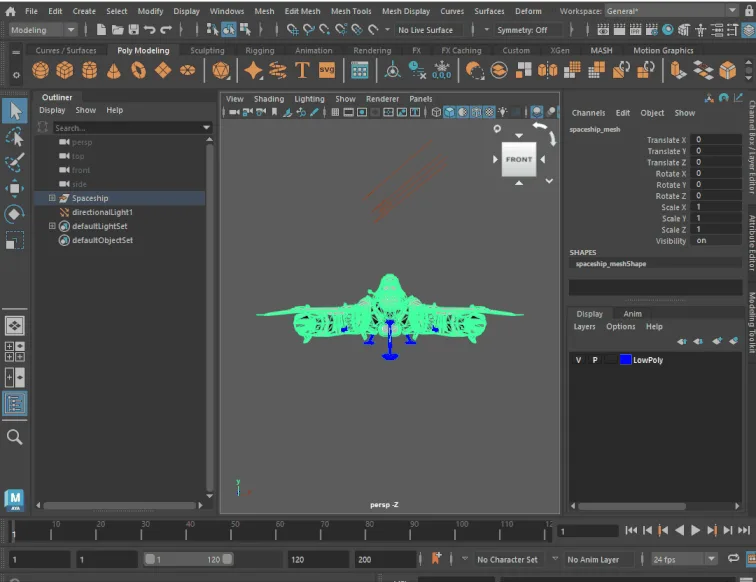
Autodesk Maya is a commercial 3D animation, modeling, simulation and rendering application, first released by Alias|Wavefront in 1998 and acquired by Autodesk in 2005. It has been the default for character rigging and animation in film, television and AAA game production for two decades, and its value comes less from any single tool than from being a platform: studios build proprietary pipelines on its Python and C++ APIs, and open source rigging frameworks such as mGear are layered on top of it. The current release is Maya 2027, out in March 2026 and updated to 2027.1 in May 2026, which added a topology aware Smart Bevel, an integrated version of the ngSkinTools skinning plugin Autodesk acquired, and OpenTimelineIO support in the Sequencer. Maya is subscription only, since perpetual licences no longer exist, and a standard commercial seat costs USD 2,010 per year. Its own toolset is not the strongest at every job, since modelers often prefer 3ds Max or Blender and heavy sculpting goes to ZBrush, but most pipelines that use those tools still route back through Maya for rigging, animation and scene assembly.
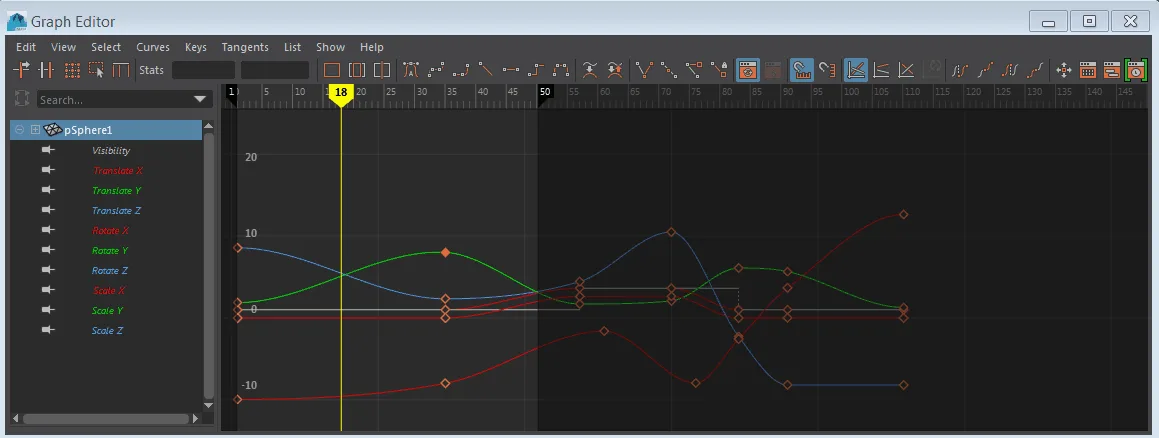
Granular control over skeletons, inverse and forward kinematics, skin weighting and blend shapes, driven through the Graph Editor and Dope Sheet. This is the part of Maya reviewers single out most consistently, and the reason studios keep it at the centre of the pipeline even when modeling and sculpting happen elsewhere. Maya 2027 folded in ngSkinTools, a layer based skinning plugin Autodesk acquired, so weight painting no longer needs a third party add-on.
Maya originally evaluated its dependency graph on a single CPU thread, which throttled playback on complex character rigs. The Evaluation Manager now builds a separate evaluation graph, spreads the work across all cores and offloads heavy deformations to the GPU, so multi layered rigs play back at interactive framerates. The trade-off is fragility: a custom node that forces dirty propagation incorrectly makes Maya fall back to single threaded evaluation, silently losing the speedup.
A node based environment for simulation and procedural geometry inside Maya, covering aero and combustion, MPM based snow and cloth, ocean surfaces and, since Bifrost 3, rigid body dynamics with fracturing and booleans. Graphs package into reusable compounds that a studio can share. Houdini still owns large scale cinematic destruction, but Bifrost keeps small and mid scale simulation work from leaving Maya.
Deep OpenUSD integration allows non destructive assembly of large scenes so multiple departments can work on the same shot without overwriting each other. LookdevX authors shading networks in the MaterialX standard, which are portable to other applications and renderers instead of needing manual translation per engine. Autodesk develops the USD plugin in the open at github.com/Autodesk/maya-usd.
Nearly everything is scriptable, which is why large studios standardise on Maya: technical directors build proprietary tools and deformers on top of it. Worth knowing before you start is that the three Python interfaces are not equivalent. PyMEL is the friendliest and by far the slowest; published profiling puts the OpenMaya API 2.0 orders of magnitude ahead on heavy computation, and community wrappers such as cmdx exist to give API speed with PyMEL style syntax.
The ML Deformer trains a neural network on frames of an expensive muscle or cloth simulation, then substitutes a fast approximation so animators get near real time playback on secondary characters. MotionMaker generates motion for biped characters without keyframing, and added an equine character in 2027. Maya 2027 also ships an AI assistant that answers workflow questions from the documentation, still labelled a technical preview.
Recurring themes across third-party user reviews (G2, Capterra, TrustRadius).


Autodesk Maya is not free. It is paid software with no free tier, starting at USD 2,010/year.
| Plan | Price | What you get |
|---|---|---|
| Annual subscription | USD 2,010/year | Standard commercial seat, billed annually, which Autodesk shows as USD 168/month. Autodesk quotes this as a 33 percent saving against monthly billing. |
| Monthly subscription | USD 255/month | Same full feature set with no long term commitment. Suits short contracts and temporary staffing changes. |
| 3 year subscription | Paid annually, 3 year term | Same 33 percent saving as the 1 year term. Autodesk states that a 3 year term protects against price increases for its duration, which matters because the list price rose from USD 1,945 to USD 2,010 per year between Maya 2026 and 2026.3. |
| Maya Indie | USD 330/year | Full feature set, restricted by revenue: your annual gross from creative work must be under USD 100,000 and no single project may be valued above it. One licence per user, available in selected countries only. |
| Maya Creative | From USD 3/day, USD 300/year minimum | A cut down pay as you go edition. It disables third party plugin support and Bifrost simulation, so it is not usable with external renderers such as V-Ray or Redshift or with studio scripts. |
| Flex tokens | From USD 99 for 33 tokens | Pay as you go across Autodesk products. Maya costs 6 tokens per day of use, roughly USD 18/day, and tokens expire one year after purchase. The minimum bundle was recently reduced from 100 tokens. |
| Education | Free | Full feature set for students and educators on renewable one year terms. Non commercial use only, and files carry an educational licence marker. |
Where pipeline standardisation, scripting depth and multi department collaboration on shared scenes matter more than per seat cost. The scripting APIs and USD assembly are what these teams actually buy.
The area where Maya has no real rival in professional practice. Reviewers consistently name the rigging system, referencing and Graph Editor as the reason they stay, even when they prefer other tools for modeling.
At USD 330 per year, qualifying solo artists get the full application and stay file compatible with the studios that outsource to them, which is often the real requirement.
Free on an educational licence, and still the software most commonly named in job listings for animation and rigging roles.
Even the cheapest commercial route costs real money every year, and Blender covers the same ground for free with a modeling workflow many reviewers prefer. Unless you specifically need studio file compatibility, the spend is hard to justify.
Broadcast graphics, animated logos and product visualisation are faster in Cinema 4D, whose MoGraph system is built for art direction without deep keyframing. Maya can do the work but makes you build what MoGraph gives you.
Maya's dependency graph records history destructively, whereas 3ds Max's modifier stack lets you step back and change base geometry without breaking later operations. For boolean heavy hard surface work and CAD linked visualisation, 3ds Max or Blender is the smoother path.
A standard commercial seat is USD 2,010 per year, or USD 255 per month without a commitment, as published on Autodesk's buy page in August 2026. If your annual gross revenue from creative work is under USD 100,000 and no project you use it on is valued above that, Maya Indie is USD 330 per year for the same full application. Occasional users can buy Flex tokens instead, from USD 99 for 33 tokens, with Maya consuming 6 tokens per day of use.
No. Autodesk retired perpetual licences and Maya is subscription only. A 3 year term is the closest thing to price stability, since Autodesk states it protects against increases for the duration. Prices have moved recently: the annual list price went from USD 1,945 with Maya 2026 in March 2025 to USD 2,010 by Maya 2026.3 in November 2025.
Maya Creative is a reduced edition sold pay as you go from USD 3 per day with a USD 300 annual minimum. It covers core modeling and animation but disables third party plugin support and Bifrost simulation. If your work depends on external renderers such as V-Ray or Redshift, or on studio scripts, Maya Creative will not run them and the full application is the only option.
It depends on whether you are optimising for cost or for employment. Blender is free, has a modeling workflow many artists find faster, and includes sculpting and real time rendering out of the box. Maya costs money but remains the software most studios build their pipelines around, so it is still the common prerequisite for animation and rigging jobs in film and AAA games. For solo and freelance work with no studio file exchange, the case for paying is weak.
Alongside its native .ma and .mb scenes, Maya reads and writes OBJ, FBX, Alembic and USD, which cover most interchange with other applications and game engines. USD support is the deepest, since Maya can reference USD stages directly in the viewport rather than importing and exporting them. Additional translators cover DXF, Adobe Illustrator paths and STL, and CAD formats including STEP can be brought in for reference.
Installing Maya also installs licensing components and the Autodesk Genuine Service, which run as background processes and are not removed by a standard uninstall. Users report they resist removal while any Autodesk registry keys, licensing files or shared folders remain on the system. Autodesk publishes a clean uninstall procedure that covers the extra steps, and it is worth following in order rather than deleting files ad hoc.
Free and open source 3D creation suite covering modeling, sculpting, texturing, animation and rendering.
Browser 3D design tool for interactive web scenes, with AI generation that runs third-party models such as Hunyuan3D, Trellis 2 and Meshy.
Epic's real-time 3D engine built around Nanite virtualised geometry and Lumen dynamic lighting, used for AAA games, virtual production and archviz.